Stendhal/manual/Gameplay: Difference between revisions
imported>Kymara add template |
imported>Kymara move combat and levels above sheep and outfit, rewrite descriptions of how to attack and loot etc |
||
| Line 50: | Line 50: | ||
==Items== |
==Items== |
||
Items such as |
Items such as armor and weapons can be found in the Stendhal world, or bought for hard earned cash. |
||
(Hint: Explore the tavern, I've heard a shady character goes there to sell his stuff... though it might be stolen!) |
(Hint: Explore the tavern, I've heard a shady character goes there to sell his stuff... though it might be stolen!) |
||
| Line 61: | Line 61: | ||
Read more at [[StendhalAtlas]] |
Read more at [[StendhalAtlas]] |
||
| ⚫ | |||
Combat is an important way of improving your character. You improve your attack and defence skills by being in combat, and killing increases your experience. Success in combat depends equally on your combat skills and your experience level. |
|||
| ⚫ | |||
| ⚫ | To attack a creature simply <b>click</b> it or <b>right click</b> on it and choose <b>Attack</b>. You will see that a red box appears almost immediately around it. This indicates an attack is being carried out. You need to be next to the target in order to actually hit them, unless you are using a ranged weapon like bow and arrows or missiles, in which case you must stand within a close range. |
||
| ⚫ | |||
| ⚫ | |||
| ⚫ | |||
| ⚫ | |||
| ⚫ | |||
| ⚫ | |||
| ⚫ | |||
| ⚫ | |||
| ⚫ | |||
| ⚫ | |||
| ⚫ | |||
| ⚫ | |||
| ⚫ | |||
| ⚫ | |||
| ⚫ | |||
| ⚫ | |||
| ⚫ | Once you have killed your target it is important that you inspect its corpse to find money, food and other items: move next to the corpse, then <b>click</b> it or <b>right click</b> on it and choose <b>inspect</b>. You can identify any kind of item you find at any time by right clicking on it and choosing Look.<br> |
||
| ⚫ | |||
| ⚫ | |||
| ⚫ | |||
| ⚫ | Levels are a way to compare your character against others. Creatures also have a level, which you can see when you do right-click and 'Look' on them. If fighting one-on-one you should be able to kill a creature with less level than you without too much difficulty. Creatures of around the same level as you, you may need <item>potion|potions</item> to defeat. Creatures of a higher level will be a challenge for you to kill, even with potions. Also you should note that if you are fighting a group of creatures you will get hurt more (since there are more of them) so fighting a group of creatures with less level than yourself can still put you in a lot of danger. |
||
| ⚫ | |||
| ⚫ | |||
==Sheep== |
==Sheep== |
||
| Line 81: | Line 121: | ||
[[Image:Aeryberrybush.png]] |
[[Image:Aeryberrybush.png]] |
||
<b>Right Click</b> on your sheep and choose <b>Look</b> to see how fat it has become. The fatter the sheep, the more you will get for it when you sell it. |
<b>Click</b> or <b>Right Click</b> on your sheep and choose <b>Look</b> to see how fat it has become. The fatter the sheep, the more you will get for it when you sell it. |
||
Sheep aren't very intelligent. So if your sheep gets stuck or isn't near you just write <b>sheep</b> and it will start moving to your position. You can verify the sheep's position by writing <b>/where sheep</b>. |
Sheep aren't very intelligent. So if your sheep gets stuck or isn't near you just write <b>sheep</b> and it will start moving to your position. You can verify the sheep's position by writing <b>/where sheep</b>. |
||
| Line 102: | Line 142: | ||
If you just close the window nothing will be changed. |
If you just close the window nothing will be changed. |
||
| ⚫ | |||
Combat is an important way of increasing your level. You only get experience by killing. You can't improve your skills by training like in other games. |
|||
| ⚫ | |||
| ⚫ | |||
| ⚫ | |||
| ⚫ | |||
| ⚫ | |||
| ⚫ | |||
| ⚫ | |||
| ⚫ | |||
| ⚫ | |||
| ⚫ | |||
| ⚫ | |||
| ⚫ | |||
| ⚫ | |||
| ⚫ | |||
| ⚫ | |||
| ⚫ | |||
| ⚫ | |||
| ⚫ | |||
| ⚫ | Once you have killed your target it is important that you inspect its corpse to find money, food and other items: move next to the corpse |
||
| ⚫ | |||
| ⚫ | |||
| ⚫ | |||
| ⚫ | Levels are a way to compare your character against others. Creatures also have a level, which you can see when you do 'Look' on them. If fighting one-on-one you should be able to kill a creature with less level than you without too much difficulty. Creatures of around the same level as you, you may need |
||
| ⚫ | |||
| ⚫ | |||
The [[LevelTables|Level Progression Tables]] show how much XP is needed for each level. |
The [[LevelTables|Level Progression Tables]] show how much XP is needed for each level. |
||
Revision as of 21:29, 2 May 2010
Characters / Learning About Quests
You should talk to other characters to get help and to find out about quests to complete.
There are two kinds of characters:
- Other Players with their name printed in white
- Non Player Characters (NPC) with their name printed in light blue
All of the NPCs reply to Hi (most of them reply also to Hello and Hola), so greet them and ask them for help, their offer, or quests.
Some of them will sell and buy sheep or items, others heal you, and others are simply "useless" but may tell you about their job.

An example of a conversation with Xin Blanca could be:
<manuella> hi
<Xin Blanca> Greetings! How may I help you?
<manuella> help
<Xin Blanca> I buy and sell several items, ask me for my offer.
<manuella> offer
<Xin Blanca> Have a look at the blackboards on the wall to see my offers.
<manuella> buy leather legs
<Xin Blanca> 1 pair of leather legs will cost 35. Do you want to buy it?
<manuella> yes
<Xin Blanca> Congratulations! Here is your pair of leather legs!
<manuella> bye
<Xin Blanca> Bye.
Sometimes you can buy more than one item at the same time:
<miguel> buy 10 minor potions
You can also get more than one item produced at once:
 <miguel> mill 10 flour
 <Jenny> I can only mill 10 flour if you bring me 50 grain.
Some NPCs like to talk to you. If they say something in blue you can repeat it to get further information.
 <Tad> I have a task for you.
 <miguel> task
 <Tad> I need you to get a flask from Margaret
NPCs who teach you initial steps are:
- Hayunn Naratha in the room where you start, teaches you how to kill and inspect corpses
- Ketteh Wehoh, in Semos village, teaches you how to talk with NPCs
- Monogenes, in Semos city, gives you a map of Semos
- Io Flotto in Semos temple, tells you how to /msg other players and more.
Items
Items such as armor and weapons can be found in the Stendhal world, or bought for hard earned cash. (Hint: Explore the tavern, I've heard a shady character goes there to sell his stuff... though it might be stolen!)
Items increase your Attack or Defence values accordingly. They must be equipped by dragging them onto a particular section of the player in the Top right GUI. This little representation of your player allows you to visualise what they are wearing/using.
World of Stendhal
Explore it! :)

- Google-maps enabled world map with zoom and pan http://stendhalgame.org/world/atlas.html
- 100% scale map here
- 100% scale map with zone names: here
- 100% scale map with dungeon entrances: here
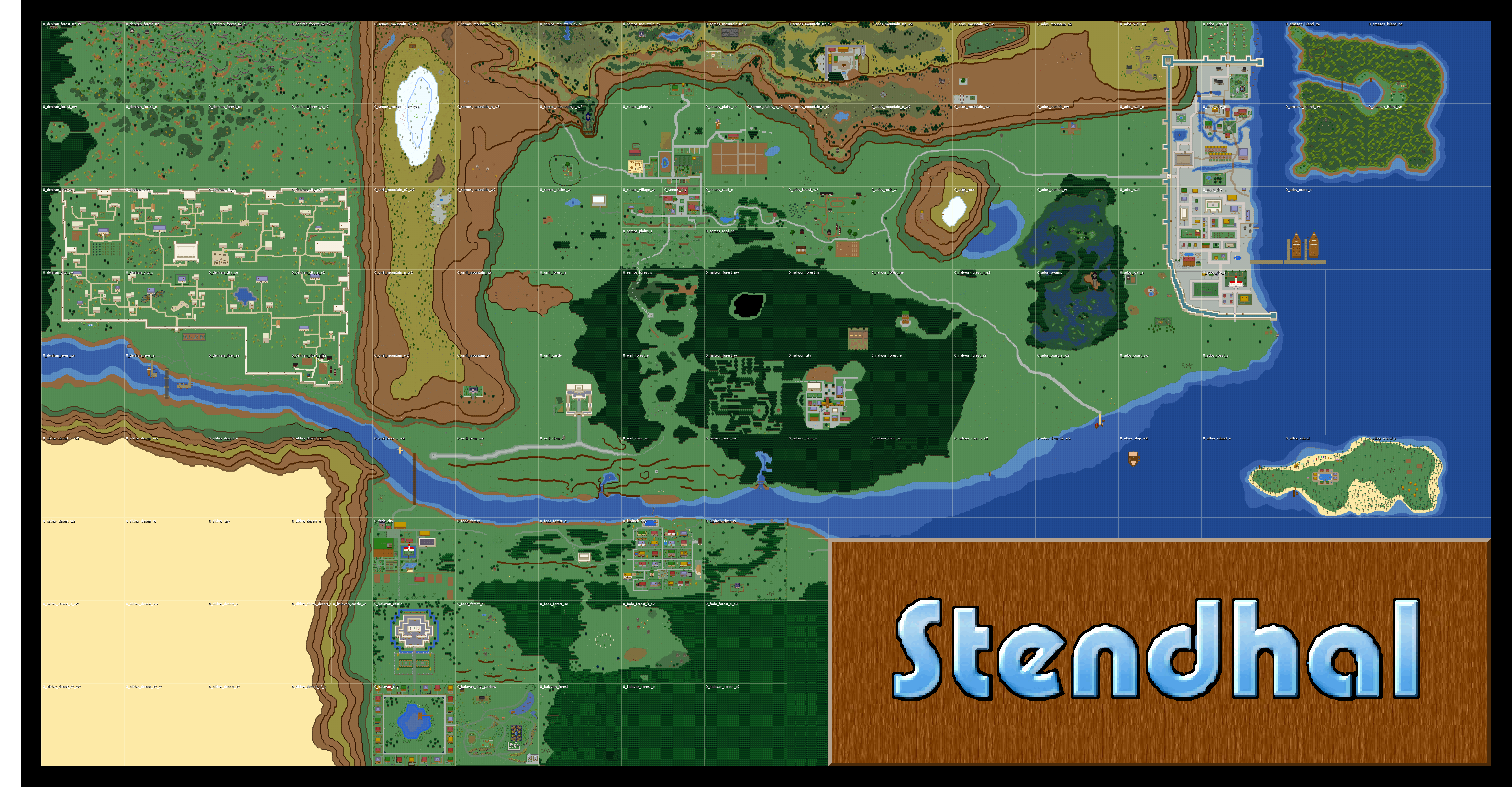
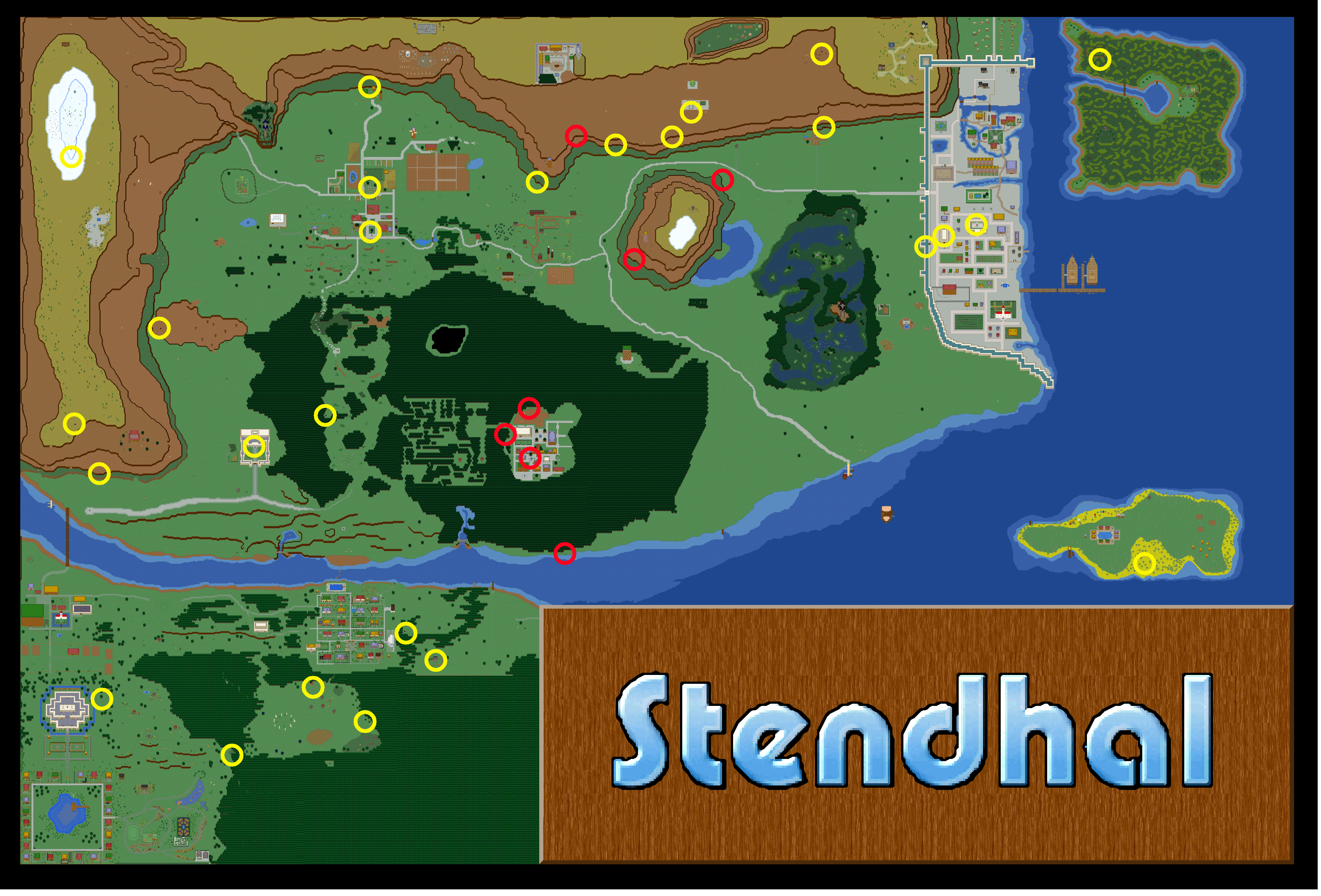
This map represent current status of the Stendhal World. It only shows the ground level to avoid spoiling interesting dungeons. Dungeons meant to be hidden are not marked to avoid spoiling interesting quests.
Read more at StendhalAtlas
Combat
Combat is an important way of improving your character. You improve your attack and defence skills by being in combat, and killing increases your experience. Success in combat depends equally on your combat skills and your experience level.
When a creature is attacking you, it has a yellow square round it and you have a red square around you.
To attack a creature simply click it or right click on it and choose Attack. You will see that a red box appears almost immediately around it. This indicates an attack is being carried out. You need to be next to the target in order to actually hit them, unless you are using a ranged weapon like bow and arrows or missiles, in which case you must stand within a close range.

Your attack will continue until:
- you stop it using "Stop attack" action
- you press ESC
- you change zone (area)
- your target is dead
Combat is round based, and each round last around 1.6 seconds. Each round the attack is resolved and the result is displayed in the right-bottom corner of the target:
- a cloud means you failed to hit the target.

- a shield means you hit the target but that you were unable to damage it.

- a blood drop means you hit the target and damaged it. Also you will see a red number pop out of the target indicating the amount of damage actually done.

If you kill your target you will see a blue number pop out which is the experience reward you have gained.

Once you have killed your target it is important that you inspect its corpse to find money, food and other items: move next to the corpse, then click it or right click on it and choose inspect. You can identify any kind of item you find at any time by right clicking on it and choosing Look.
To store items in your bag you can move them there by drag and drop or simply click them.
Levels and Stats
Your character has a level attribute that expresses how strong that character is.
Levels are a way to compare your character against others. Creatures also have a level, which you can see when you do right-click and 'Look' on them. If fighting one-on-one you should be able to kill a creature with less level than you without too much difficulty. Creatures of around the same level as you, you may need potions to defeat. Creatures of a higher level will be a challenge for you to kill, even with potions. Also you should note that if you are fighting a group of creatures you will get hurt more (since there are more of them) so fighting a group of creatures with less level than yourself can still put you in a lot of danger.
With each kill or quest completed you are rewarded experience points (XP). If you get enough XP you will level up. To see how many XP remaining till you level up next, look at the number in brackets after your Level on your character window. The remaining numbers are explained below

Sheep
Once you have bought a sheep it will follow you wherever you go. It's your job to protect and feed it.
The icon shown in the upper-right corner of the sheep will show you what it is thinking.
- A yellow man means it is currently following you.

- A hamburger means it would like to eat. Your sheep will go to the nearest food source.

- Little feet means it is just wandering around. This sheep isn't owned by anyone (anymore).

Sheep like to eat fruits. These fruits can be found on the many bushes in Stendhal. A bush can carry up to five fruits. Over time these will grow back. So if your sheep has eaten all of it, it's time to move to the next bush.

Click or Right Click on your sheep and choose Look to see how fat it has become. The fatter the sheep, the more you will get for it when you sell it.
Sheep aren't very intelligent. So if your sheep gets stuck or isn't near you just write sheep and it will start moving to your position. You can verify the sheep's position by writing /where sheep.
Unfortunately once you own a sheep you can't leave the zone without your sheep being near you. So make sure it is near before trying to leave. If you are in a hurry you can leave your sheep. To leave your sheep right click on yourself and choose leave sheep.
Sometimes sheep are silly and they trap you. If this happens, then leave your sheep. He'll walk away then when you're free you can own him again.
You can also own a released wild sheep again by right clicking on it and choosing own.
Outfit
Outfit helps you to feel the real role playing experience.
You can choose your outfit by mixing a set of different styles of bodies, heads, hairs and clothes.

To bring up the dialog Right Click your character and choose Set Outfit. Click OK when you are done.
You can also choose not to wear clothes at all :)
If you just close the window nothing will be changed.
The Level Progression Tables show how much XP is needed for each level.