VisualGuideToInstallingStendhalStep2: Difference between revisions
imported>Kymara make clear what is to corrrect a bad step and what is the next stage to follow |
imported>Kymara add missing images |
||
| Line 3: | Line 3: | ||
Start MySQL command line client: |
Start MySQL command line client: |
||
[[Image:Step2MySQLCreateDB02.png]] |
|||
[[Image:Step2MySQLCreateDB03.png]] |
|||
at <tt>Enter password</tt>: prompt, enter root password chosen at the previous step (root if you have followed indications) |
at <tt>Enter password</tt>: prompt, enter root password chosen at the previous step (root if you have followed indications) |
||
[[Image:Step2MySQLCreateDB04.png]] |
|||
http://arianne.sourceforge.net/wiki_images/visual_guide_server/Step2MySQLCreateDB/Step2MySQLCreateDB04.png |
|||
Note: if MySQL client closes before or after entering root password at <tt>Enter password:</tt> prompt that can mean three things: |
Note: if MySQL client closes before or after entering root password at <tt>Enter password:</tt> prompt that can mean three things: |
||
| Line 15: | Line 14: | ||
*That you have not set a root account successfully (type just <tt>enter</tt> to test and it should prompt you with <tt>mysql></tt>). |
*That you have not set a root account successfully (type just <tt>enter</tt> to test and it should prompt you with <tt>mysql></tt>). |
||
::In thiscase you need to: |
::In thiscase you need to: |
||
::*Run the ''MySQL server instance config wizard'' from the MySQL group menu:<br> |
::*Run the ''MySQL server instance config wizard'' from the MySQL group menu:<br>[[Image:Step2MySQLCreateDB02.png]][[Image:Step12MySQLConfigure18.png]] |
||
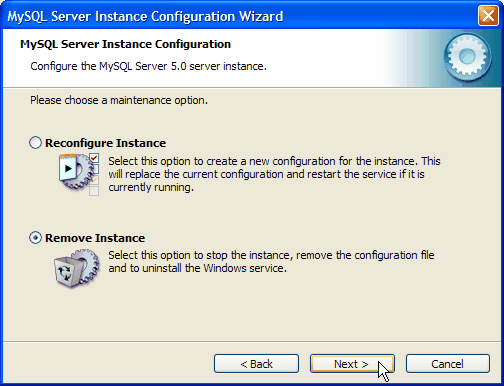
::*Choose <tt>Remove Instance</tt> and click <tt>Next</tt><br> |
::*Choose <tt>Remove Instance</tt> and click <tt>Next</tt><br>[[Image:Step12MySQLConfigure17.png]] |
||
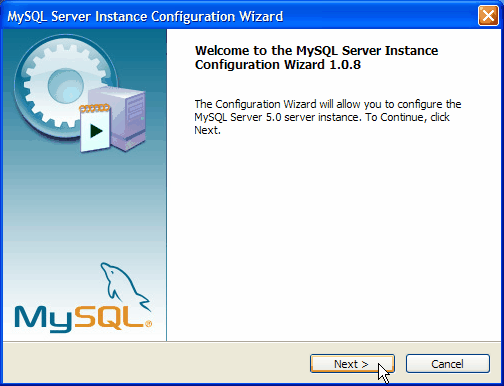
::*Run the ''MySQL server instance config wizard'' again from the MySQL group menu:<br> |
::*Run the ''MySQL server instance config wizard'' again from the MySQL group menu:<br>[[Image:Step2MySQLCreateDB02.png]][[Image:Step12MySQLConfigure18.png]] |
||
::*and repeat [[VisualGuideToInstallingStendhalStep1#Step 1.2. Configure MySQL|Step 1.2]] from the beginning (close your firewall this time before clicking on <tt>execute</tt>)<br> |
::*and repeat [[VisualGuideToInstallingStendhalStep1#Step 1.2. Configure MySQL|Step 1.2]] from the beginning (close your firewall this time before clicking on <tt>execute</tt>)<br>[[Image:Step12MySQLConfigure01.png]] |
||
<br> |
<br> |
||
| Line 29: | Line 28: | ||
and USE your mouse and right-click anywhere inside the window and choose paste. |
and USE your mouse and right-click anywhere inside the window and choose paste. |
||
[[Image:Step2MySQLCreateDB05.png]] |
|||
Then press <tt>enter</tt> |
Then press <tt>enter</tt> |
||
[[Image:Step2MySQLCreateDB06.png]] |
|||
Copy again from here: |
Copy again from here: |
||
| Line 45: | Line 44: | ||
'''Note:''' With the previous statement you are granting total access to the database named ''marauroa'' to the user named ''stendhal_user'' with the password ''stendhal_passwd''. Remember to use this same username and password when [[VisualGuideToInstallingStendhalStep4#ConfigureMarauroa_EnterUserPassword|configuring marauroa at step 4]]. |
'''Note:''' With the previous statement you are granting total access to the database named ''marauroa'' to the user named ''stendhal_user'' with the password ''stendhal_passwd''. Remember to use this same username and password when [[VisualGuideToInstallingStendhalStep4#ConfigureMarauroa_EnterUserPassword|configuring marauroa at step 4]]. |
||
[[Step2MySQLCreateDB08.png]] |
|||
type ''quit'' or ''exit'' (to quit or exit the command line client :P) or copy from here: |
type ''quit'' or ''exit'' (to quit or exit the command line client :P) or copy from here: |
||
Revision as of 23:09, 3 January 2010
Step 2. Create a MySQL database
Start MySQL command line client:


at Enter password: prompt, enter root password chosen at the previous step (root if you have followed indications)

Note: if MySQL client closes before or after entering root password at Enter password: prompt that can mean three things:
- That MySQL service is not running in the background. Go to services and start it as explained in Step 6.
- That you entered a bad root password. Run the client again and type it right.
- That you have not set a root account successfully (type just enter to test and it should prompt you with mysql>).
- In thiscase you need to:
- Run the MySQL server instance config wizard from the MySQL group menu:


- Choose Remove Instance and click Next
- Run the MySQL server instance config wizard again from the MySQL group menu:
- and repeat Step 1.2 from the beginning (close your firewall this time before clicking on execute)
- Run the MySQL server instance config wizard from the MySQL group menu:
- In thiscase you need to:


Otherwise, you have entered successfully and you should now me welcomed to MySQL.
At prompt copy from here:
create database marauroa;
and USE your mouse and right-click anywhere inside the window and choose paste.

Then press enter

Copy again from here:
grant all on marauroa.* to stendhal_user@localhost identified by 'stendhal_passwd';
and USE your mouse and right-click anywhere inside the window and choose paste. Then press enter
Note: With the previous statement you are granting total access to the database named marauroa to the user named stendhal_user with the password stendhal_passwd. Remember to use this same username and password when configuring marauroa at step 4.

type quit or exit (to quit or exit the command line client :P) or copy from here:
quit
Then press enter and the window will close.
Go to Step 4. Install stendhal server
Step 3 is no longer needed - one used to install marauroa there, but now marauroa is included as a pre built jar in the stendhal server distribution.)
Back to Visual Installation Guide Step-By-Step
Back to stendhal main wiki page