StendhalDesign: Difference between revisions
| Line 260: | Line 260: | ||
The key on making Stendhal moving is to add actions. |
The key on making Stendhal moving is to add actions. |
||
As we have seen each entity has a list of actions that can do. Let's see them and study they interact. |
As we have seen each entity has a list of actions that can do. Let's see them and study they interact. |
||
Our main entity is Player, it is gamer's avatar in stendhal world and as such, it is able to do the next set of actions: |
|||
* Move<br>Move action can be understand as two actions: |
|||
** Move to left,right,up or down while key is down<br>This action allows controlling gamer's avatar using our keyboard that is the arcade/adventure game style like Nintendo Zelda. |
|||
This action should have the next set of attributes: |
|||
*** '''dx''' horizontal speed of the avatar |
|||
*** '''dy''' vertical speed of the avatar |
|||
We can have as many as we want of this action. The last action executed will be the only one that alters really dx and dy. |
|||
** Move to a position<br>This action allows controlling game's avatar using a mouse, so we can click ( or double click ) to move to the position where the mouse clicked. This mode is great for a more relaxed adventure game style like Bioware Baldur's Gate. |
|||
This action should have the next set of attributes: |
|||
*** '''x''' desired x coordinate of the avatar |
|||
*** '''y''' desired y coordinate of the avatar |
|||
We can only have ONE action of this type and only the latest one will be considered valid. This action is cancelled by any other action like Move, Attack, Face, ... |
|||
Both move actions will have at each end of turn, moving the avatar if it is possible dx units in the x axis and dy units in the y axis. |
|||
If avatar collides with something while moving, dx and dy will become 0. |
|||
* Face<br>This action is useful as a extra for the social side of the game; when you are talking it is often good to ''face'' the person you are talking too. So face action allows our character to look at the direction we tell it: left, right, up or down. |
|||
* Chat<br>This action is the base of any social game like a MORPG. |
|||
This action should have the next set of attributes: |
|||
** '''text''' text that the player is going to say |
|||
Due to Arianne framework it is not possible to create a yell or whisper action, when you talk, you talk for everybody in the area, that is why area design is *VERY* important to achieve a good gameplay. |
|||
* Attack<br>This action is the core of the gameplay for lots of gamers to consider the game fun. All the combat is ruled by the RP game system explained in the RP section of this page. |
|||
There are some limitations for combat right now: |
|||
* No PvP ( Player versus Player ) |
|||
* Can't attack sheeps |
|||
* Can't attack yourself |
|||
* Can't attack NPC |
|||
We want to preserve a nice game experience so we have removed player vs player combat. |
|||
We can have only ONE attack action, so choose wisely your target, and this action is cancelled by any other action but '''Chat''' and '''Heal'''. |
|||
This action should have the next set of attributes: |
|||
** '''target''' the object.ID of the player that we are attacking. |
|||
This action require that the target of the action is ''near'' our avatar. Near means that target's avatar have to be colliding with our avatar. |
|||
The attack action has the implicit meaning of following the target. |
|||
=RP= |
=RP= |
||
Revision as of 13:10, 15 March 2005
This small doc tries to create an agreement on what stendhal is about and what it needs to include. It considers the existing [Roadmap] and tries to give a coherent vision of what we are trying to create.
Please use the Discussion tab (found in the menu at the top of the page) to query about things or make suggestions.
Plot
Stendhal's plot is to grow Sheep by taking them with you to the plains or forest to graze.
The task is not as simple as it may sound though, as you will have to protect them from hungry wolves! Use your skill, strength and wit to destroy the attackers.
Lambs must first be bought at a Farm and later sold at the Village when they are plump enough. For each Sheep you sell, when fully grown, you will get extra income.
You will need to spend your money on new weapons, armor and healing potions.
As you can see Stendhal is a minigame that will try to push and thus test everything related to a fully blown RPG:
- task
- actions
- areas
If Arianne is a successful platform to get Stendhal working, the only issue is scaling up the result. :)
Design
Idea
The whole game area will look like:
http://arianne.sourceforge.net/wiki_images/Stendhal_Map.jpg
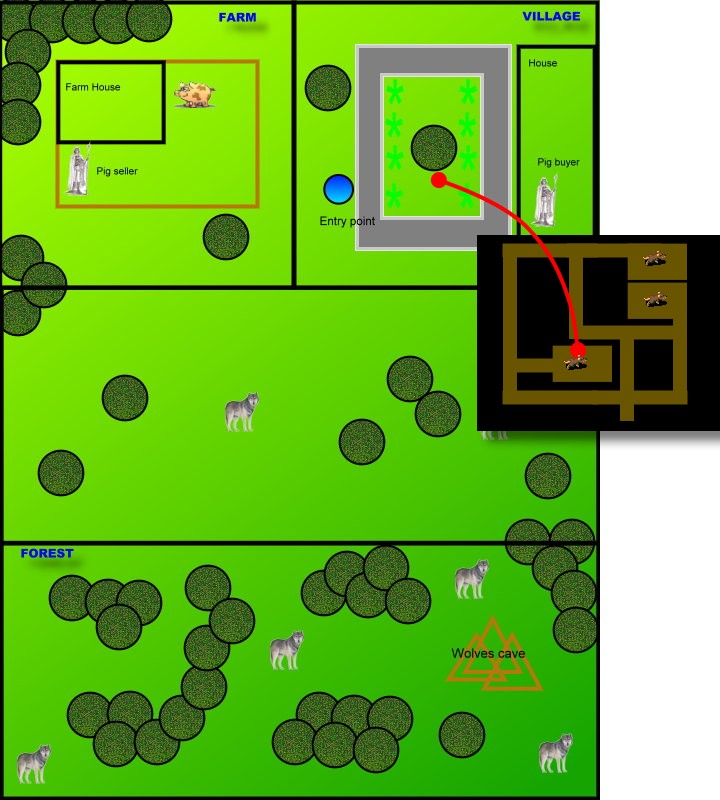
It is split in to 4 different areas to test the multizones feature of Arianne.
Players need to change zone in order to accomplish their task.
Use cases description
We need to use several use cases to describe our game.
Player's user case
Player is an entity that play the game, it can move, chat, attack, heal.
  Player enter village in entry point
  Player moves to Farm zone

  Player talks with Sheep seller
    Player: Hi
    Seller: Greetings! How may I help you?
    Player: buy Sheep
    Seller: Do you want to buy a Sheep for 50 coins?
    Player: yes
    Seller: Thank you! Bye

  Player moves. Sheep follows Player.
  Player moves to plains
  Player moves around looking for food
  Player protect Sheep of wolves attacks

  When Sheep is big enough Player moves to Village
  Player talks with Sheep buyer
    Player: Hi
    Buyer: Greetings! How may I help you?
    Player: sell Sheep
    Buyer: Do you want to sell this Sheep for 73 coins?
    Player: yes
    Buyer: Thank you! Bye

  Player spend money in new Sheep and equipment
  * Armor
  * Weapon
  * Healing potions
Sheep seller's user case
This seller is a NPC entity that will sell us a sheep to grow it up and make money.
FOREVER do:
  Listen to Player

  If listen "Hi":
    Seller says "Greetings <Player>!"

  If listen "Buy Sheep" from Player:
    Seller says "Do you want to buy a Sheep for 50 coins?"

  If listen "yes" from Player:
    If Player money - 50 > 0:
      set Player money=Player money - 50
      Duplicate Sheep
      Make Sheep follows Player
  Say bye to Player
DONE
Sheep buyer's user case
This buyer is a NPC entity that will buy us our sheep.
FOREVER do:
  Listen to Player

  If listen "Hi":
    Seller says "Greetings <Player>!"

  If listen "Sell Sheep" from Player:
    Estimate Sheep value related to Sheep weight
    Seller says "Do you want to sell buy a Sheep for <estimated price> coins?"

  If listen "yes" from Player:
    set Player money=Player money + <estimated price>
    Destroy Sheep

  Say bye to Player
DONE
Sheep's user case
Sheep is our key game concept. Sheeps must be grow up to earn money and buy stuff.
  Sheep is in Farm
  Player buys Sheep
  Sheep seller duplicates Sheep
  Sheep follows Player

  If Sheep finds food:
    Sheep moves to food
    Sheep eats food
    Sheep gains weight

  Player sells Sheep
  Sheep dissappear
Wolf's user case
Wolf is the compitive entity on Stendhal. They join to attack sheeps and often also players. They can kill a sheep in not a long time.
  Wolf moves
  If Wolf sees Sheep:
    Wolf attacks Sheep

  If Wolf is attacked:
    Wolf attacks Attacker
Entities
The above user cases describe the need for the following entities in our system:
- Sheep
- Sheep seller
- Sheep buyer
- Wolf
- Player
- Food
- Armor
- Weapon
- Healing potion
Let's describe each entity and its attributes and actions.
Sheep
A sheep has the following set of attributes:
- x is the x-position of the sheep
- y is the y-position of the sheep
- dx is the x-speed of the sheep
- dy is the y-speed of the sheep
- hp is the life indicator of the sheep, when it reach 0 the sheep dies.
- weight is the weight indicator of the sheep, the more weight, the more expensive it is.
Sheep tasks should be:
- follow
- eat
The sheeps behaviour is mainly to follow its owner and look for food.
If the Sheep finds food, it will eat.
Sheep will runaway if attacked by wolves.
Wolf
Wolves have the following set of attributes:
- x is the x-position of the wolf
- y is the y-position of the wolf
- dx is the x-speed of the wolf
- dy is the y-speed of the wolf
- hp is the life indicator of the wolf, when it reach 0 the wolf dies.
- atk is the RP attack value. See RP rules
Wolf tasks should be:
- follow means that wolf follows an object using the shortest way to reach it.
- attack means that wolf will try to damage the attacked object until its hp reach 0
Another action will cancel attack task. - patrol means that wolf will move around a specified path.
- chat means that wolf will start to shout 'auuuuuuu!'. Wolves will often understand this as a call.
Wolf behaviour consists of patrolling some assigned areas.
If the Wolf finds a Sheep, it will attack Sheep.
If the Wolf is attacked, the Wolf returns the attacks.
If the Wolf is injured, the Wolf will runaway.
Sheep seller and Sheep buyer
The buyer and seller have the following set of attributes:
- x is the x-position of the NPC
- y is the y-position of the NPC
- dx is the x-speed of the NPC
- dy is the y-speed of the NPC
- attending is the object_id of the player that is actually attending.
seller and buyer tasks would be:
- patrol means that NPC will move around a specified path.
NPC behaviour consists of listening to people near them.
If person says "Hi", NPC faces person and generates conversation.
Player
The player has the following set of attributes:
- x is the x-position of the player
- y is the y-position of the player
- dx is the x-speed of the player
- dy is the y-speed of the player
- hp is the life indicator of the player, when it reach 0 the sheep dies.
- atk is the RP attack value. See RP rules
- exp is the experience of the player.
- money is the quantity of money the player has.
It has three slots:
- armor
- left hand
- right hand
- backpack
- flock
Player tasks should be:
- move means that player will change its dx, dy params to move.
- attack means that player will try to damage the attacked object until its hp reach 0.
Another action will cancel attack task. - chat means that player writes text to other players or NPCs
Food
Food has the following set of attributes:
- x is the x-position of the player
- y is the y-position of the player
- quantity is the amount of food available
Food will be regenerated every X units of time.
Armor
Armor is an item that player can wear:
- x is the x-position of the armor when player doesn't wear it.
- y is the y-position of the armor when player doesn't wear it.
- def is the RP defense value. See RP rules
- weight is the weight of the armor.
Shield
Shield is an item that player can wear:
- x is the x-position of the shield when player doesn't wear it.
- y is the y-position of the shield when player doesn't wear it.
- def is the RP defense value. See RP rules
- weight is the weight of the shield.
Weapon
Weapon is an item that player can wear:
- x is the x-position of the weapon when player doesn't wear it.
- y is the y-position of the weapon when player doesn't wear it.
- atk is the RP attack value. See RP rules
- weight is the weight of the weapon.
Healing potion
Healing potion is an item that player can wear inside the backpack:
- x is the x-position of the potion when player doesn't wear it.
- y is the y-position of the potion when player doesn't wear it.
- heal is the amount of HP the potion will heal.
Actions
The key on making Stendhal moving is to add actions. As we have seen each entity has a list of actions that can do. Let's see them and study they interact.
Our main entity is Player, it is gamer's avatar in stendhal world and as such, it is able to do the next set of actions:
- Move
Move action can be understand as two actions:- Move to left,right,up or down while key is down
This action allows controlling gamer's avatar using our keyboard that is the arcade/adventure game style like Nintendo Zelda.
- Move to left,right,up or down while key is down
This action should have the next set of attributes:
- dx horizontal speed of the avatar
- dy vertical speed of the avatar
We can have as many as we want of this action. The last action executed will be the only one that alters really dx and dy.
- Move to a position
This action allows controlling game's avatar using a mouse, so we can click ( or double click ) to move to the position where the mouse clicked. This mode is great for a more relaxed adventure game style like Bioware Baldur's Gate.
- Move to a position
This action should have the next set of attributes:
- x desired x coordinate of the avatar
- y desired y coordinate of the avatar
We can only have ONE action of this type and only the latest one will be considered valid. This action is cancelled by any other action like Move, Attack, Face, ...
Both move actions will have at each end of turn, moving the avatar if it is possible dx units in the x axis and dy units in the y axis. If avatar collides with something while moving, dx and dy will become 0.
- Face
This action is useful as a extra for the social side of the game; when you are talking it is often good to face the person you are talking too. So face action allows our character to look at the direction we tell it: left, right, up or down.
- Chat
This action is the base of any social game like a MORPG.
This action should have the next set of attributes:
- text text that the player is going to say
Due to Arianne framework it is not possible to create a yell or whisper action, when you talk, you talk for everybody in the area, that is why area design is *VERY* important to achieve a good gameplay.
- Attack
This action is the core of the gameplay for lots of gamers to consider the game fun. All the combat is ruled by the RP game system explained in the RP section of this page.
There are some limitations for combat right now:
- No PvP ( Player versus Player )
- Can't attack sheeps
- Can't attack yourself
- Can't attack NPC
We want to preserve a nice game experience so we have removed player vs player combat. We can have only ONE attack action, so choose wisely your target, and this action is cancelled by any other action but Chat and Heal.
This action should have the next set of attributes:
- target the object.ID of the player that we are attacking.
This action require that the target of the action is near our avatar. Near means that target's avatar have to be colliding with our avatar.
The attack action has the implicit meaning of following the target.
RP
Role playing games are based in a set of rules. There are many set of rules: AD&D, GURPS, Warhammer,...
Stendhal defines a new typical set of rules, that has in common simplicity and ease of computing.
The system is based around 3 ideas:
- Randomness using 1D6
- Risk evaluation
- Creativity
Risk evaluation gives the DM the power to weight up an action that a player wishes to perform against things like how experienced the player is in that type of action and the situation the player is in.
DM stands for Dungeon Master. In Stendhal our task is to design the DM, as it rules the game.
Attributes
Each player has a set of attributes that are:
- attack - this value is used to resolve attack situations.
- defense - this value is used to resolve situations where the player is attacked.
- hp - this value stored the live points available.
- level - this starts off as zero when the character is created and will increase related to experience
- experience - this is the amount of experience gained at the current level
Experience and levels
All of the attributes can be increased during the game through gaining experience and levels. Experience is awarded by DM for several reasons:
- good roleplaying
- use of skills
- combats
Experience can't be gained by training.
When you gain a level you can increase one of the attributes. To reach a level you need to reach the next experience points:
| Level | Experience needed |
| 1 | 10 |
| 2 | 20 |
| 3 | 40 |
| 4 | 80 |
| 5 | 160 |
| 6 | 320 |
| 7 | previous*2 |
Combat
Combat is a fight between two or more players.
The combat is round based. Each round takes 10 turns.
To determine whose player start first choose the player who has the biggest value of:
Player.Level + 1D6
The risk to strike a player can be written as:
Attacker.attack + 1D6 VS Defender.defense + Defender.shield.rating + 1D6
If player is hit we need to compute the wound that has been done:
  result = Attacker.weapon.rating - Defender.armor.rating + 1D6 each 6 Attacker.level
  if result > 0:
    Defender.hp = Defender.hp - result
  end if
Death happens when hp reachs 0.
hp points are recovered at a natural rate of 1 HP point each 1000 turns.
Shields
The shield rating adds to your defense skill:
| Shield | Rating |
| Buckler shield | +1 |
| Small shield | +2 |
| Medium shield | +3 |
| Tower shield | +5 |
Armour
Armour helps you absorb damage.
| Armour | Rating |
| Leather armour | +1 |
| Studded leather armour | +2 |
| Scale mail armour | +3 |
| Chain mail armour | +4 |
| Plate mail armour | +5 |
| Field plate armour | +6 |
| Full plate armour | +7 |
Weapon
Weapon helps you to kill :)
| Weapon | Rating |
| Knife | +2 |
| Club | +3 |
| Spear | +4 |
| Axe | +5 |
| Long sword | +6 |
| Two hand sword | +7 |