Ideas for Stendhal/Magic: Difference between revisions
imported>Kymara No edit summary |
imported>Madmetzger |
||
| Line 112: | Line 112: | ||
* Use spell via slash action ''cast'' (the ''spell id'' can be found in the attributes list when inspecting the spell in the spells panel - for example ''[id=22]'', same for creatures as target): |
* Use spell via slash action ''cast'' (the ''spell id'' can be found in the attributes list when inspecting the spell in the spells panel - for example ''[id=22]'', same for creatures as target): |
||
/cast [spell id] [target name or id] |
/cast [spell id] [target name or id] |
||
* Casting spells is also possible via mouse and keyboard: |
|||
** select spell via shortcut control + number displayed on spell / click on spell to select |
|||
** cast spell at target via click |
|||
* Seeing spells client side needs the feature ''spells'' enabled for the testing player (keyed slot !features needs an entry for ''spells'') |
* Seeing spells client side needs the feature ''spells'' enabled for the testing player (keyed slot !features needs an entry for ''spells'') |
||
/script EnableFeature.class [character] spells |
/script EnableFeature.class [character] spells |
||
This can be undone by the DisableFeature script: |
This can be undone by the DisableFeature script: |
||
/script DisableFeature.class [character] spells |
/script DisableFeature.class [character] spells |
||
=== Ideas on casting spells via GUI === |
=== Ideas on casting spells via GUI === |
||
* The spell to be casted should be activated in the spell slot by left-clicking on it (it is then highlighted). |
* The spell to be casted should be activated in the spell slot by left-clicking on it (it is then highlighted). |
||
Revision as of 19:05, 1 April 2012
- |


Ideas for Stendhal
- RP Proposal with Skills
- RP Refactoring
- Character Classes
- Items
- Magic
- Effects
- Pets and sheep
- Alchemy and Crafting
- Upgrading weapons
- Temp. stats increase
- Containers
- Item Deterioration
- Player vs. Player Challenges
Mostly implemented
Related pages
Previous discussions from meetings
Defining spells
- Spells should be configurable via XML

- works so far see light.xml for example in CVS
- Spells should follow the natures defined via the former DamageType
- Spells have limitations
- limited casting frequency (cool down time)
- wearing special equipment (example in code)
- spells should need knowledge to learn for casting them (partly )
- limited casting frequency (cool down time)
- Spells are separated into 2 parts:
- The spell itself defining nature, mana use, cool down time and other possible prerequisites like equipment
- Spell's effect defining what the spell does i.e. a simple healing spell just uses a healing effect that could be reused for a mass healing spell affecting all players in range
- Effects that temporarily affect entity's attributes need changes to other classes, as it seems more reasonable to store changes separately. For example an effect boosting a player's attack should not simply adjust the player's attribute but the method calculating atk should consider such additional effects
- The spell itself defining nature, mana use, cool down time and other possible prerequisites like equipment

Spell Ideas
Sorted
- Light
- Heal - Heal another player
 - unless they have engaged in PvP within the last 10 minutes
 - Mass heal - heal multiple players around - unless they have engaged in PvP within the last 10 minutes
- Shield of Light - Increase defense for some time
- Adding a sound around the player (should somehow fit to the nature)
- Heal - Heal another player
- Dark
- Lifedrain - Draining health from the enemy to heal yourself

- Adding a sound around the player (should somehow fit to the nature)
- Lifedrain - Draining health from the enemy to heal yourself
- Ice
- Freeze - Slow down an enemy for some time

- Snow Storm - Push away enemies should depend on the size of the enemy
- Adding a sound around the player (should somehow fit to the nature)
- Freeze - Slow down an enemy for some time
- Fire
- Fireball - Ranged attack on one enemy

- Explosion - Ranged attack on several enemies + pushing away the enemies around ( + damaging yourself a bit)
- Adding a sound around the player (should somehow fit to the nature)
- Fireball - Ranged attack on one enemy
Unsorted
- Teleport away (to a random choice from preset locations)
- Cloak of invisibility for short time
- perhaps only for non-players and only for creature whos level is not much above the caster's level
- Boost skills for short time
- Weaken creature
- Summon friendly creature
- Raise dead creature
- Revive player (i.e. if you are near corpse you can bring them back so they don't have to walk from afterlife - require confirm from dead player)
- Return to private house
- Make campfire
- Vanity spells (no actual affect except some temporary change to appearance, etc) these may be good ones to introduce at the beginning for testing the system as they would have less effect on game play
- A drawing effect on the player like a sparkle
- Colour a pet / sheep
- Different outfit
Needed Changes To Entities
Some spell like Freeze or Weaken Creature temporarily affect specific attributes of an entity. As it is reasonable not to change the attributes themselves, it is necessary to add attribute modifiers to an entity.
A first approach would store the modifier factors in a class and the entity classes compute an attribute's value by summing up all modifiers and applying it to the actual attribute's value. To reflect the temporal nature of a modifier it is capable of determining its validity based on a timestamp within the method isValid. This approach has the obvious disadvantage, that within GuidedEntity the modifiers for not existing attributes are available.
The second approach uses an additional layer of indirection to hide the modifiers for not existing attributes. On each level of the entity inheritance hierarchy is a specific modifier defined that is called to calculate the modified value.
The TurnNotifier is used to clean up expired modifiers. As a modifier is able to distinguish between being valid and not, it is not necessary, that this clean up helper runs every second or even more frequently.
- Attribute modifiers variants
-
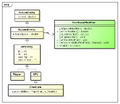 Simple modifier
 -
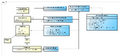 Modifier concept hiding the "full" modifiers


The second option has been implemented.
Learning Spells
Learning spells should be a two step thing. First you have to solve a quest and then you can learn spells from a wizard in exchange of money. There should be one quest per nature and the quests should be startable by the fitting wizard then. As a rough scheme the learning quests could be a combination of collector and kill quest. For example it could be like “bring 5 carbuncles and kill a red dragon” if a someone wants to learn about fire magic.
- Quest ideas:
There could be another quest, that enables the four other quests and rewards you with the necessary items like spellbook or magic wand. The starting NPC could also sell those items if you lost them after having solved that quest: Stendhal Quest Ideas/Learn about magic
A shop for each nature is available after solving the learning quest for each nature. In those shops players will be able to buy new spells.
- Learning spells
- Quests per nature that allow player to buy spells from a shop
- Reward of those quests could be a first spell additionally to being allowed to buy
GUI integration
The client has to support casting spells in several ways. First of all there is need for displaying spells and functionality for casting and target selection. Furthermore it is desirable to add some visual effects for a casted spell and even more some sound effects for that.
As a very first step it is helpful to be able to test spells without having the full infrastructure available. So there is a script called SummonSpell to obtain spells for a player and there's also a simple slash command that enables a tester to cast a spell at a desired target.
- Client Integration
- Client server communication
- Small images to represent a spell
- Images for
- spellbook
- magic wand
- magician's robe
- magician's hat
- GUI integration
- Show spells
- Cast spells
- visual effects
- showing when someone is healed for example
- sound effects
- Client server communication
Allow early testing
For being able to test as early as possible there is some code that enables to test the already implemented spells. There are basically three steps to consider:
- Equip the testing player with a spell via the script SummonSpell:
/script SummonSpell.class [character] [spell name]
- Provide mana to the testing player (first one rises the base value and second alter gives actual mana):
/alter [character] base_mana add 1000
/alter [character] mana add 1000
- Use spell via slash action cast (the spell id can be found in the attributes list when inspecting the spell in the spells panel - for example [id=22], same for creatures as target):
/cast [spell id] [target name or id]
- Casting spells is also possible via mouse and keyboard:
- select spell via shortcut control + number displayed on spell / click on spell to select
- cast spell at target via click
- Seeing spells client side needs the feature spells enabled for the testing player (keyed slot !features needs an entry for spells)
/script EnableFeature.class [character] spells
This can be undone by the DisableFeature script:
/script DisableFeature.class [character] spells
Ideas on casting spells via GUI
- The spell to be casted should be activated in the spell slot by left-clicking on it (it is then highlighted).
- Casting the spell to an entity could be done by using SHIFT + click or via context menu ("cast fireball").
- Healing spells and area effect spells should not be repeated after casting them.
- Attacking spells should be casted repeatedly until the target is dead. To stop casting the spell you can use the "stop attack" action in the context menu or change the active spell.
Graphic Ideas
 |
Spell natures (ice, fire, light, dark) |
 |
Example for the spell "heal" |
 |
Example for the spell "fireball" - scary :) |
 |
Example for the spell "freeze" |
 |
Example for the spell "drain" - or something else :) |
 |
A bottle of mana |
 |
A magic wand |
Balancing
- Spells use mana
- necessary attributes called mana and base_mana are already there
- necessary attributes called mana and base_mana are already there
- Mana should be regenerated
- via potions
- slowly when no attacks are aiming at the player
- cooldown time
- necessary equipment
- magician's robe
- magic wand
- magician's hat
- spellbook
Mages
The player is not going to have to decide his class to be a mage in order to be able to use magic. We are not going to have a strict line, between warrior and mage. Players might be 80% warrior 20% mage because they happen to fight 80% of the time and only use magic 20% of the time Our implementation of magic, the balancing above, is what will ensure, that the player can't be overpowerful or combine brute force with magic, effectively.
TODO
- add more spells and effects as examples
- extend entity classes with an entity based attribute value manipulator value effect
- add graphics for spells
- add spell book to client
- add graphics for magician's equipment
- develop quests to learn magic (one per nature)
- dark
- light
- fire
- ice
- Check if SellerBehaviour could deal with spells