StendhalManual: Difference between revisions
imported>Hendrik Brummermann |
imported>Hendrik Brummermann |
(No difference)
| |
Revision as of 11:40, 22 March 2007
Introduction
What is Stendhal?
Are you looking for adventure? Want to fight for riches? Develop yourself and your social standing? Meet new people? Do you want to be part of a brave new world?
Stendhal is a full fledged multiplayer online adventures game (MMORPG) developed using the Arianne game development system.
Stendhal features a new, rich and expanding world in which you can explore towns, buildings, plains, caves and dungeons. You will meet NPCs and acquire tasks and quests for valuable experience and cold hard cash. Your character will develop and grow and with each new level up become stronger and better. With the money you acquire you can buy new items and improve your armour and weapons. And for the blood thirsty of your; satisfy your killing desires by roaming the world in search of evil monsters!
Stendhal is totally platform independent, written using Java 1.5 and the Java2D environment.
So what are you waiting for?! A whole new world awaits...
Why play Stendhal?
- Stendhal is free!
- Stendhal is open source and by playing you help us improve it.
- Stendhal is a small download.
- Stendhal is a big world.
- A nice community.
- Lots of creatures to kill.
Aims of Stendhal
Stendhal aims to make you have a fun time. Stendhal features a world in constant evolution, with tons of interesting quests to accomplish and thousands of friends to meet. And the best of it is that it is a never ending game :)
What do I need to play Stendhal?
Stendhal is a Java game and works in any platform that is able to run the Sun Java JRE, that includes:
- Windows
- Linux
- MacOS
So you need at least [Java 1.5] to run it. Right now Stendhal won't work with GCJ, so if you are a developer with experience in GCJ, you may want to help porting Stendhal to SDLjava.
Setting up the game
Creating an account
To create an account, just open the game and click on Create account.
http://arianne.sourceforge.net/wiki_images/createaccount_001.png

Now fill the fields:
- Choose your Stendhal server. If you are not sure about what to do, simply choose the default one. In case you want to connect to a different server, please enter it's hostname there.
- Port. Usually Stendhal servers runs at port 32160.
- Username. It is the name of your avatar in the Stendhal world.
- Password. Type in your password twice. It will secure your access to Stendhal, so choose a good one.
- Email. Just in case we need to reset the password or contact you.
Your account will be ready immediately.
http://arianne.sourceforge.net/wiki_images/createaccount_002.png

Downloading the game
You can run it directly using Java Webstart (this means you do not need to download anything, just click the webstart link and if Java is installed on your system the game will start) or you can download the compiled java program to your computer at http://sourceforge.net/project/showfiles.php?group_id=1111
Controls and Game settings
Starting the game
To launch Stendhal use Java webstart or by running the stendhal-0.XX.jar file that is in the stendhal download package.
http://arianne.sourceforge.net/wiki_images/manual_000.jpg

Click on the Login to Stendhal button and enter your account information.
Be sure to choose the server where you created your account (the name will be the same as the site you went to to create the account in the first place. The default option is probably correct) and finally click on Login to Server.
http://arianne.sourceforge.net/wiki_images/manual_001.jpg

A progress bar will appear and soon you will be connected to the world.
http://arianne.sourceforge.net/wiki_images/manual_002.jpg

If the server is down (not online) you will get an error message explaining this. In this case either try again later or create a new account on another server.
Game screen
http://arianne.sourceforge.net/wiki_images/manual_018.jpg

- Minimap
The minimap shows the actual position of the player with a cross. Minimap only shows the actual zone non walkable areas. - Player's bag
This is the bag where you can store up to twelve items. If the bag closes and you want to open it again, click on settings Windows(6) and click on player inventory. - Chat line
You write the text to talk to other players and npcs here. You can also write commands here. There is a basic help writing /help - Dialogs log
Here are all the messages received in the current session stored (game messages and player messages). It is very useful for conversational proposes. - Player's inventory
You can equip items as weapons, armors, legs, helmets and boots to obtain advantages. - Settings window
Contains buttons to reopen the minimap, the player inventory and the player bag. - Game area
All the gameplay happens here.
Basic controls
Move
Use the keyboard arrows to move around on the Map.
http://arianne.sourceforge.net/wiki_images/manual_004.jpg

You must hold down the direction keys to make the character to move. Your character will collide with elements that exists on the world, like other players and walls.
Alternatively you can move by double clicking on an empty place of the game area.
You also collide with map borders. When you reach a map border your screen won't move any further and two things might happen:
- if an area exists next to the area you are in, you will move from your current area to the new area (you will be transfered to the new zone).
- if no area exists nothing will happen and you will simply collide and stop.
Passing Through Doors
You can simply pass through the doorway by using the keyboard arrows. In the case that there is someone standing in front of the doorway and blocking it you still can pass through the door if you can get next to the door diagonally: just right click on the door and choose use.
Moving With An Animal
If you have an animal following you such as a sheep, to change zones the animal MUST be within visible distance from your charater. To find out where your animal is, type /where <name of animal> ... for example /where sheep
Face
When attacking someone or talking to someone it is nice to face them. To do this press Ctrl and a directional arrow to face in that direction. It is just an eye candy action as it has no effect on the game rules.
Moving Items
During the game you will find or buy items such as swords and shields. To move these items around the world, use the left click and drag to the place you want them to be. You need to be next to the item. To drop a smaller amount of a stackable item use the /drop command. Say you have 2000 money and want to give 100 money away: /drop 100 money
Managing Inventory
You can manage your inventory by dressing items, dropping them to floor or by storing them on your backpack. On all the cases the procedure is the same: click on the item and drop it to the desired position.
Keep in mind that you must be near an item to equip it and that you can't drop it further than 8 positions from you.
http://arianne.sourceforge.net/wiki_images/equipitems_000.png

Drag and drop the item in inventory slot you want.
http://arianne.sourceforge.net/wiki_images/equipitems_001.png

And you have equipped it.
http://arianne.sourceforge.net/wiki_images/equipitems_002.png

You can equip any item in any slot right now, but this will change.
Other actions
Click the right mouse button over objects to see a contextual menu (which will include actions that can be performed on the object) and use the left mouse button to choose an action from the menu You can click outside the area of the menu to abort it.
http://arianne.sourceforge.net/wiki_images/manual_006.jpg

Open Game Dialog log
In case you have closed the game dialog (the window where all the text and game information appears) you can open it again with Ctrl+L (hold Control Key and L key)
http://arianne.sourceforge.net/wiki_images/manual_008.jpg

This dialog contains all the important events that happen in game so it is advised to have it visible.
Use Shift+UP arrow or Shift+DOWN arrow (hold Shift and press arrows) to put in your dialog text bar the last written sentence. Each time you press the up arrow (while still holding the shift key) you go further back in the history of your previously written sentences. When you use the down arrow instead you can go forward. That way you don't have to write again previously used sentences, for example, when you sell items.
Exit game
Press ESC to exit. You will be prompted again to either really quit or return to the game. Alternatively you can simply close the window. In any case, your information about your inventory stuff and position in the game is automatically saved before you quit the game.
"http://arianne.sourceforge.net/wiki_images/quitgame_000.png"

Player communication
To communicate with other players simply type! Press Enter to send your chat message. A chat bubble will appear under your character and a new line will appear in the Game log dialog. This kind of communication is public and visible to every player in world, although you will only see text for players near you.
Alternatively you can write:
/tell playername chat Content
This allows you to write to a single character privately. For example:
/tell miguel This game rules, really. I have rated it 10/10 :)
In order to ease the communication you can write to the lasted player you msged using //
// Really man!, go and rate it.
You can also write any of the administrators that are in game to request support by writting /support
/support I keep getting an out of memory exception, so the game crashes, can I avoid this?
Finding persons
You can discover who is online by using the command /who.
/who
This will show a list of the players that are online now with their levels.
You can find out a players position by querying server using /where player name
/where miguel
Getting help
You can get help about the previous commands by using the command /help.
/help
This will return a list of the commands that are available to the player with a brief explanation of their usage and parameters.
Gameplay
Characters
You can and need to talk to other characters to get help and to find out about quests to complete.
There are several NPCs in Stendhal. All of them reply to Hi (most of them reply also to Hello and Hola), so greet them and ask them for help or quests.
Some of them will sell and buy sheep or items, others heal you, and others are simply "useless"
http://arianne.sourceforge.net/wiki_images/manual_009.jpg

An example of a conversation with Xin Blanca could be:
 <miguel> hi
 <Xin Blanca> Greetings! How may I help you?
 <miguel> help
 <Xin Blanca> I buy and sell several items, ask me for my offer
 <miguel> sell
 <Xin Blanca> Sorry, I don't buy sell
 <miguel> offer
 <Xin Blanca> I sell wooden_shield,knife,club,leather_legs,dress,small_axe,leather_helmet, I buy studded_shield,short_sword,sword,
 <miguel> buy leather_legs
 <Xin Blanca> leather_legs costs 30. Do you want to buy?
 <miguel> yes
 <Xin Blanca> Congratulations! Here is your leather_legs!
 <miguel> Bye
 <Xin Blanca> Bye.
Sometimes you can buy more than one item at the same time:
<miguel> buy 10 minor_potion
Notice that names of items doesn't contain spaces between words (they use _ as separator) and the name of the item is always singular independently of the amount being bought.
Items
Items such as armour and weapons can be found in the Stendhal world, or bought for hard earned cash. (Hint: Explore the tavern, I've heard a shady character goes there to sell his stuff... though it might be stolen!)
Items increase your Attack or Defence values accordingly. They must be equipped by dragging them onto a particular section of the player in the Top right GUI. This little representation of your player allows you to visualise what they are wearing/using.
World of Stendhal
Explore it! :)

- Google-maps enabled world map with zoom and pan http://stendhalgame.org/world/atlas.html
- 100% scale map here
- 100% scale map with zone names: here
- 100% scale map with dungeon entrances: here
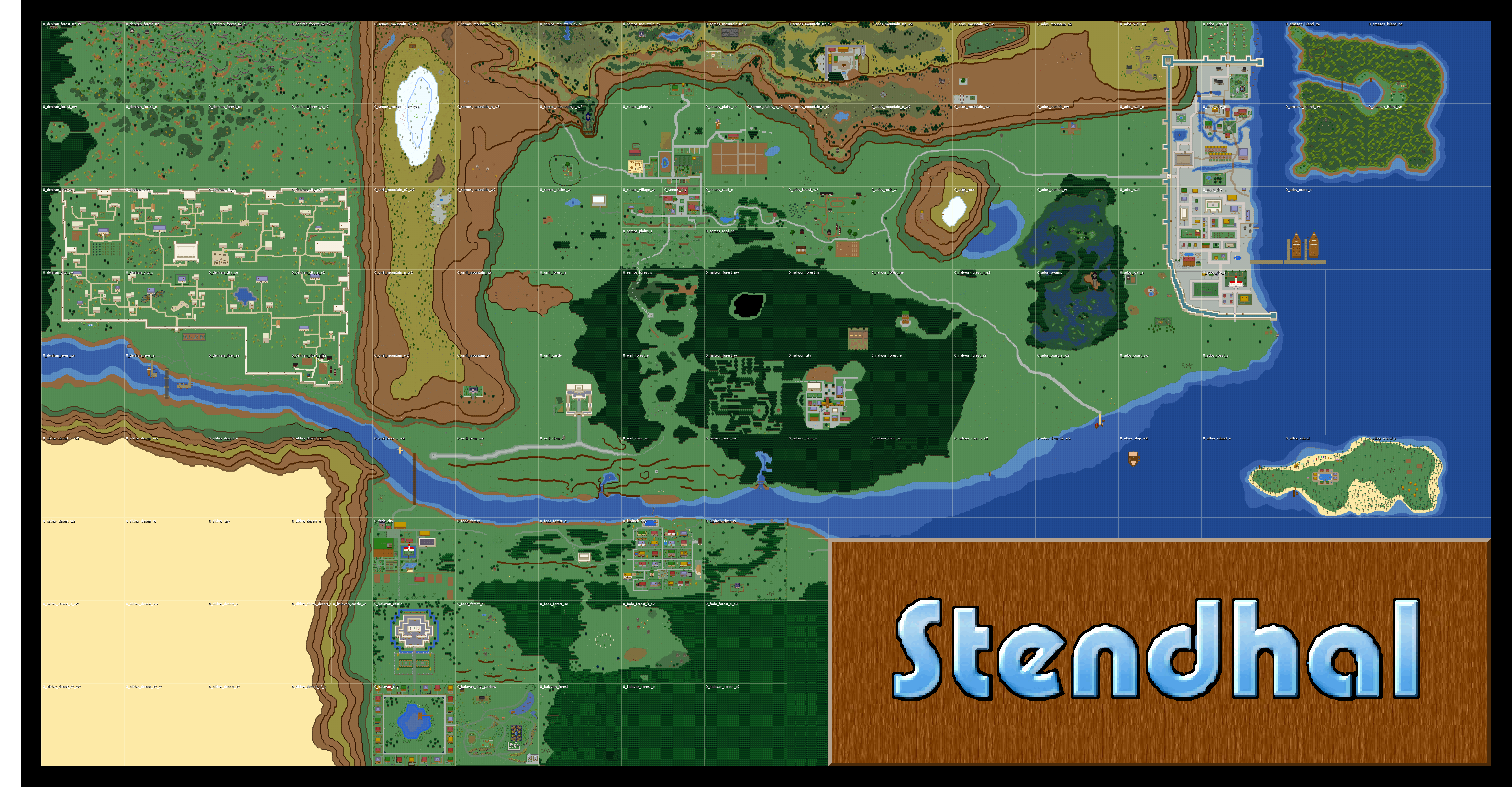
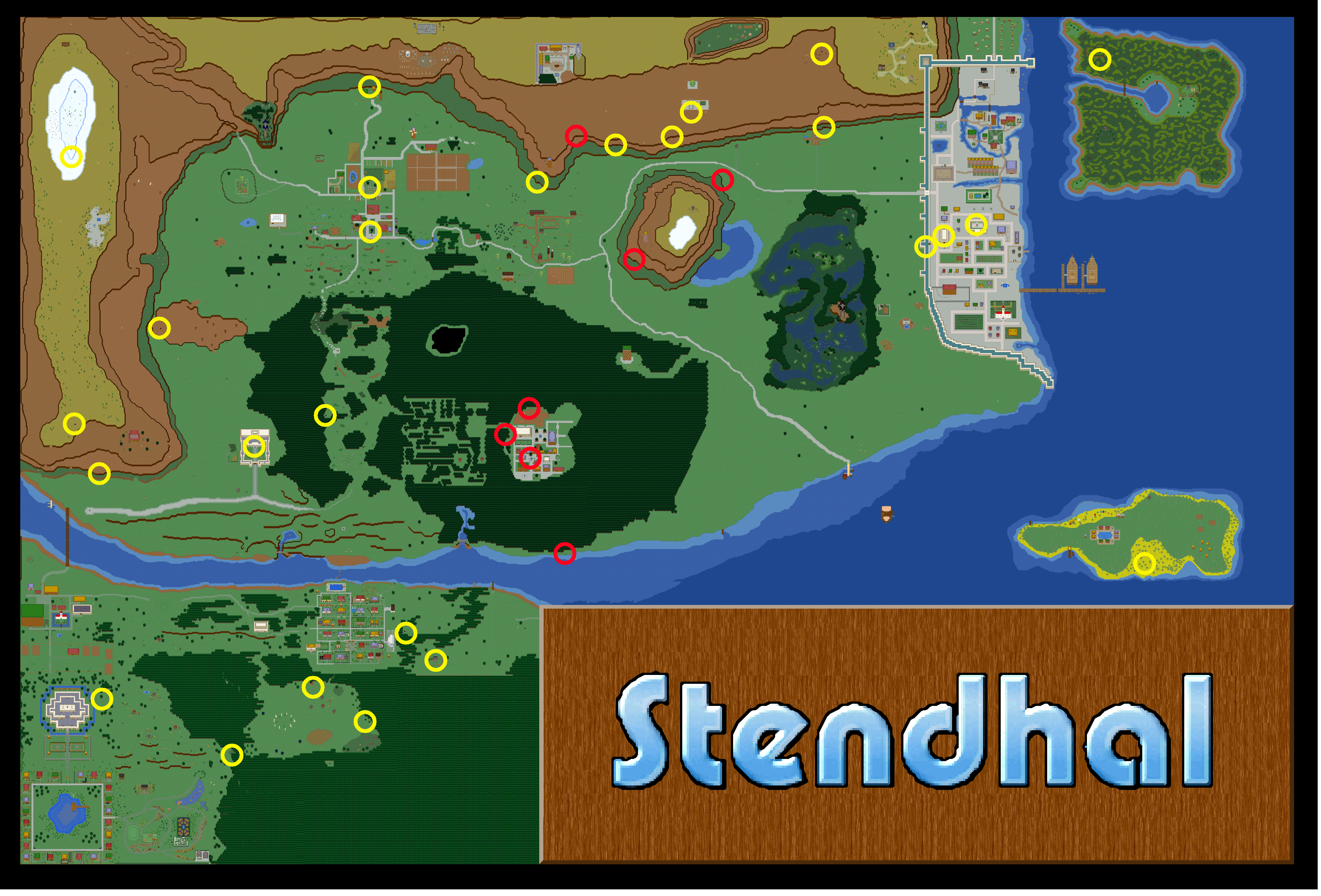
This map represent current status of the Stendhal World. It only shows the ground level to avoid spoiling interesting dungeons. Dungeons meant to be hidden are not marked to avoid spoiling interesting quests.
Read more at StendhalAtlas
NPCs (Non Player Characters) And Learning About Quests
All around the world of Stendhal are numerous NPCs all waiting to give you some tips on available quests.
All NPCs respond to saying hi and usually to quest. Some may have different things to say so try asking them multiple times. NPCs also respond to help.
Sheep
Once you have bought a sheep it will follow you wherever you go. It's your job to protect and feed it.
The icon shown in the upper-right corner of the sheep will show you what it is thinking.
- A yellow man means it is currently following you.
http://www.j-a-r-n-o.nl/following.png

- A hamburger means it would like to eat. Your sheep will go to the nearest food source.
http://www.j-a-r-n-o.nl/eating.png

- Little feet means it is just wandering around. This sheep isn't owned by anyone (anymore).
http://www.j-a-r-n-o.nl/wandering.png

Sheep like to eat fruits. These fruits can be found on the many bushes in Stendhal. A bush can carry up to five fruits. Over time these will grow back. So if your sheep has eaten all of it, it's time to move to the next bush.
http://www.j-a-r-n-o.nl/bushes.png

Right Click on your sheep and choose Look to see how fat it has become. The fatter the sheep, the more you will get for it when you sell it.
Sheeps aren't very intelligent. So if your sheep gets stuck or isn't near you just write sheep and it will start moving to your position. You can verify the sheep's position by writing /where sheep.
Unfortunately once you own a sheep you can't leave the zone without your sheep being near you. So make sure it is near before trying to leave. If you are in a hurry you can leave your sheep. To leave your sheep right click on yourself and choose leave sheep.
Sometimes sheep are silly and they trap you. If this happens, then leave your sheep. He'll walk away then when you're free you can own him again.
You can also own a released wild sheep again by right clicking on it and choosing own.
Outfit
Outfit helps you to feel the real role playing experience.
You can choose your outfit by mixing a set of different styles of bodies, heads, hairs and clothes.
http://arianne.sourceforge.net/wiki_images/manual_17.jpg

To bring up the dialog Right Click your character and choose Set Outfit. Click OK when you are done.
You can also choose not to wear clothes at all :)
If you just close the window nothing will be changed.
Combat
Combat is an important way of increasing your level. You only get experience by killing. You can't improve your skills by training like in other games.
To attack a creature simply right click on it and choose Attack or double-click it. You will see that a red box appears almost immediately around it. This indicates an attack is being carried out. You need to be next to the target in order to actually hit them though!
http://arianne.sourceforge.net/wiki_images/manual_010.jpg

Your attack will continue until:
- you stop it using "Stop attack" action
- you press ESC
- you change zone (area)
- your target is dead
Combat is round based, and each round last around 1.6 seconds. Each round the attack is resolved and the result is displayed in the right-bottom corner of the target:
- a cloud means you failed to hit the target.
http://arianne.sourceforge.net/wiki_images/manual_010.jpg
- a shield means you hit the target but that you were unable to damage it.
http://arianne.sourceforge.net/wiki_images/manual_011.jpg

- a blood drop means you hit the target and damaged it. Also you will see a red number pop out of the target indicating the amount of damage actually done.
http://arianne.sourceforge.net/wiki_images/manual_012.jpg

If you kill your target you will see a blue number pop out which is the experience reward you have gained.
http://arianne.sourceforge.net/wiki_images/manual_013.jpg

Once you have killed your target it is important that you inspect its corpse to find money, food and other items: move next to the corpse and right click on it and choose inspect (you can also double-click to inspect). You can identify any kind of item you find at any time by right clicking on it and choosing look.
To store items in your bag you can move them there by drag and drop or simply double-click them.
Levels
Your character has a level attribute that expresses how strong that character is.
Levels are the only way of comparing your character against others.
With each kill or quest completed you are rewarded experience points (XP). If you get enough XP you will level up and gain a development point (a development point is a point to add to your skill in a number of different fields. This is the way in which you make your character stronger and better)[Note: development points aren't implemented yet].
http://arianne.sourceforge.net/wiki_images/manual_014.jpg

You can spend development points on:
- +1 ATK level (your attack skill)
- +1 DEF level (your defense skill)
- +10 HP points (your hit points, i.e. the amount of damage you can take before you die)
http://arianne.sourceforge.net/wiki_images/manual_015.jpg

Once you have spent your point you can't undo your decision, so choose carefully. This allows you to properly choose the direction of skill your character will follow.
http://arianne.sourceforge.net/wiki_images/manual_016.jpg

To see how much experience is needed to change level, checkout the tables at the bottom of this manual.
Support
If u need any help ask in the game to the GM or the higher lvls.
Level Tables
The level Tables have moved to it's own page now, check Level Progression Tables to see it.