Ideas for Stendhal/StendhalTouch: Difference between revisions
Jump to navigation
Jump to search
Content deleted Content added
imported>Balaur Use case: Drop a number of items |
imported>AntumDeluge Add mockup ideas |
||
| (9 intermediate revisions by 2 users not shown) | |||
| Line 28: | Line 28: | ||
* see the drop dialog disappearing |
* see the drop dialog disappearing |
||
== Mockup Ideas == |
|||
Some mockups I had come up with a while back for redesigning the web client UI for use with mobile/touch devices ([[User:AntumDeluge|AntumDeluge]] ([[User talk:AntumDeluge|talk]])): |
|||
<gallery> |
|||
Client_redesign_mockup.png|Redesign |
|||
Client_redesign_mockup_bag.png|Redesign bag focus |
|||
Client_redesign_mockup_bag_alt.png|Redesign bag focus (alt) |
|||
Client_redesign_mockup_chat.png|Redesign chat focus |
|||
</gallery> |
|||
See also: [[How to setup an experimental Stendhal HTML5 Environment?]] |
See also: [[How to setup an experimental Stendhal HTML5 Environment?]] |
||
Latest revision as of 04:31, 26 May 2024
The web client will also be used on mobile devices, such as tablets. The user interface needs to be:
- accessible without right-click
- accessible without keyboard-mouse combinations (such as CTRL+click/drag)
Use case: Drop a number of items
One possible solution would be to have a user interface with:
- action buttons:
- walk / attack (default)
- look
- grab
- drop dialog (visible only while dropping items)
- number selector
- ok / cancel buttons

Mockup: https://moqups.com/balaur/4pbQggTw/p:a9efc5f2f
Suppose you have a stack of 3 potions in the chest, and want to move 2 of them to the inventory. You would follow these steps:
- change the action mode to "grab"
- click on the stack of potions in the chest
- click on the inventory
- see the drop dialog appearing
- click the [+] button to increase the quantity from 1 to 2
- click the [Drop] button
- see the potions being moved
- see the drop dialog disappearing
Mockup Ideas
Some mockups I had come up with a while back for redesigning the web client UI for use with mobile/touch devices (AntumDeluge (talk)):
-
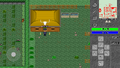 Redesign
 -
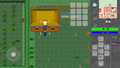 Redesign bag focus
 -
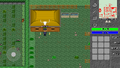 Redesign bag focus (alt)
 -
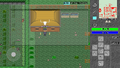 Redesign chat focus


See also: How to setup an experimental Stendhal HTML5 Environment?