Stendhal/Creature Organization/Examples: Difference between revisions
imported>AntumDeluge |
imported>AntumDeluge |
||
| (735 intermediate revisions by the same user not shown) | |||
| Line 73: | Line 73: | ||
== Option 2: More distinction between classes == |
== Option 2: More distinction between classes == |
||
<b><span style="color:blue">This organization has been implemented in CVS. The reorganization does not break client/server compatibility, but does cause some inconsistencies with logic tilesets and sprite locations. Below are some suggestions for reorganizing logic tilesets. However, changing those <i>will</i> break compatibility. Reorganizing logic tilesets and spritesheet locations will need to be done a little at a time to not create a huge incompatibility between the server and client.</span></b> |
|||
(***) Unsure about these options |
|||
<br><br>(***) Unsure about these options |
|||
=== angel.xml === |
=== angel.xml === |
||
| Line 512: | Line 514: | ||
** <creature>mountain orc</creature>, <creature>mountain orc hunter</creature>, <creature>mountain orc warrior</creature> & <creature>mountain orc chief</creature> |
** <creature>mountain orc</creature>, <creature>mountain orc hunter</creature>, <creature>mountain orc warrior</creature> & <creature>mountain orc chief</creature> |
||
=== troll.xml === |
=== troll.xml *** === |
||
<b><i><span style="color:orange">Perhaps each of these should have its own category or placed in hybrid or humanoid?</span></i></b> |
|||
* cyclops |
* cyclops |
||
** <creature>cyclops</creature> |
** <creature>cyclops</creature> |
||
* ogre |
* ogre |
||
| Line 582: | Line 585: | ||
* A possible method of organization would be to put the creatures in a file with a corresponding class name, and use a subclass tag to segregate different creatures within their class. |
* A possible method of organization would be to put the creatures in a file with a corresponding class name, and use a subclass tag to segregate different creatures within their class. |
||
Example: undead.xml <b><i><span style="color: |
Example: undead.xml <b><i><span style="color:red">This method will not be used. There is currently no use for using a subclass tag.</span></i></b> |
||
<b><i><span style="color:red">This method will not be used. There is currently no use for using a subclass tag.</span></i></b> |
|||
<pre> |
<pre> |
||
<creatures> |
<creatures> |
||
| Line 612: | Line 614: | ||
In the above example creatures <creature>skeleton</creature> & <creature>warrior skeleton</creature> would be of class ''undead'' and subclass ''skeleton'' while <creature>zombie</creature> & <creature>rotten zombie</creature> would be class ''undead'' and subclass ''zombie''.<br><br> |
In the above example creatures <creature>skeleton</creature> & <creature>warrior skeleton</creature> would be of class ''undead'' and subclass ''skeleton'' while <creature>zombie</creature> & <creature>rotten zombie</creature> would be class ''undead'' and subclass ''zombie''.<br><br> |
||
If subclass tags not possible comments can be used in place of them in the traditional method: |
If subclass tags not possible comments can be used in place of them in the traditional method: <b><i><span style="color:blue">This is how the reorganizations is laid out. It is the same as before with comments to separate subclasses within the creature.xml.</span></i></b> |
||
<pre> |
<pre> |
||
<creatures> |
<creatures> |
||
| Line 638: | Line 640: | ||
</creatures> |
</creatures> |
||
</pre> |
</pre> |
||
== Organization of logic tilesets == |
|||
The logic tilesets can either be kept in the currently used directory and just refactored to match the creature.xml files. Or the tilesets can be placed in a subdirectory of "tileset/logic/creature". For example: ''amazon'', which is a subclass of ''human'', would be located in "tileset/logic/creature/human/amazon.png". NOTE: classes with many subclasses can be divided up. |
|||
* tileset/logic/creature/ |
|||
=== angel === |
|||
* angel.png |
|||
** <b>Notes: <span style="color:red">New tileset.</span></b> |
|||
** [[ File:Logic_creature_angel.png ]] |
|||
=== animal === |
|||
* animal_arachnid.png |
|||
** <b>Notes: <span style="color:red">New tileset.</span></b> |
|||
** [[ File:Logic_creature_animal_arachnid.png ]] |
|||
* animal_crustacean.png |
|||
** <b>Notes: <span style="color:red">New tileset. ''Possibly merge into animal.png.''</span></b> |
|||
** [[ File:Logic_creature_animal_crustacean.png ]] |
|||
* animal_fowl.png |
|||
** <b>Notes: <span style="color:red">New tileset.</span></b> |
|||
** [[ File:Logic_creature_animal_fowl.png ]] |
|||
* animal_insect.png |
|||
** <b>Notes: <span style="color:red">New tileset. ''Possibly merge into animal.png.''</span></b> |
|||
** [[ File:Logic_creature_animal_insect.png ]] |
|||
* animal_mammal.png |
|||
** <b>Notes: <span style="color:red">New tileset.</span></b> |
|||
** [[ File:Logic_creature_animal_mammal.png ]] |
|||
* animal_mythical.png |
|||
** <b>Notes: <span style="color:red">Renamed tileset.</span></b> |
|||
** [[ File:Logic_creature_animal_mythical.png ]] |
|||
* animal_reptile.png |
|||
** <b>Notes: <span style="color:red">New tileset.</span></b> |
|||
** [[ File:Logic_creature_animal_reptile.png ]] |
|||
=== beast === |
|||
* beast_beholder.png |
|||
** <b>Notes: <span style="color:red">Renamed tileset.</span></b> |
|||
** [[ File:Logic_creature_beast_beholder.png ]] |
|||
* beast_gargoyle.png |
|||
** <b>Notes: <span style="color:red">Renamed tileset.</span></b> |
|||
** [[ File:Logic_creature_beast_gargoyle.png ]] |
|||
* beast_misc.png |
|||
** <b>Notes: <span style="color:red">New tileset.</span></b> |
|||
** [[ File:Logic_creature_beast_misc.png ]] |
|||
* beast_mutant.png |
|||
** <b>Notes: <span style="color:red">New tileset.</span></b> |
|||
** [[ File:Logic_creature_beast_mutant.png ]] |
|||
* beast_slime.png |
|||
** <b>Notes: <span style="color:red">New tileset.</span></b> |
|||
** [[ File:Logic_creature_beast_slime.png ]] |
|||
=== chess pieces === |
|||
* chess.png |
|||
** [[ File:Logic_creature_chess.png ]] |
|||
=== demon === |
|||
* demon.png |
|||
** <b>Notes: <span style="color:red"><creature>violet avenger</creature>, <creature>devil queen</creature> & <creature>balrog</creature> added.</span></b> |
|||
** [[ File:Logic_creature_demon.png ]] |
|||
=== dragon === |
|||
* dragon.png |
|||
** <b>Notes: <span style="color:red">New tileset.</span></b> |
|||
** [[ File:Logic_creature_dragon.png ]] |
|||
=== dwarf === |
|||
* duergar.png |
|||
** [[ File:Logic_creature_dwarf_duergar.png ]] |
|||
* dwarf.png |
|||
** <b>Notes: <span style="color:red">Removed <creature>giant dwarf</creature>, <creature>Dhohr Nuggetcutter</creature> & <creature>Lord Durin</creature>.</span></b> |
|||
** [[ File:Logic_creature_dwarf.png ]] |
|||
* giant_dwarf.png |
|||
** <b>Notes: <span style="color:red">New tileset.</span></b> |
|||
** [[ File:Logic_creature_dwarf_giant.png ]] |
|||
* mountain_dwarf.png |
|||
** [[ File:Logic_tileset_dwarf_mountain.png ]] |
|||
=== elemental === |
|||
* elemental.png |
|||
** <b>Notes: <span style="color:red">New tileset.</span></b> |
|||
** [[ File:Logic_creature_elemental.png ]] |
|||
=== elf === |
|||
* albino_elf.png |
|||
** [[ File:Logic_creature_albino_elf.png ]] |
|||
* dark_elf.png |
|||
** [[ File:Logic_creature_dark_elf.png ]] |
|||
* elf.png |
|||
** [[ File:Logic_creature_elf.png ]] |
|||
=== giant === |
|||
* giant.png |
|||
** <b>Notes: <span style="color:red">New tileset.</span></b> |
|||
** [[ File:Logic_creature_giant.png ]] |
|||
=== gnome === |
|||
* gnome.png |
|||
** [[ File:Logic_creature_gnome.png ]] |
|||
=== goblin === |
|||
* goblin.png |
|||
** [[ File:Logic_creature_goblin.png ]] |
|||
=== human === |
|||
* human_amazon.png |
|||
** <b>Notes: <span style="color:red">Renamed tileset.</span></b> |
|||
** [[ File:Logic_creature_human_amazon.png ]] |
|||
* human_assassin.png |
|||
** <b>Notes: <span style="color:red">Renamed tileset.</span></b> |
|||
** [[ File:Logic_creature_human_assassin.png ]] |
|||
* human_barbarian.png |
|||
** [[ File:Logic_creature_human_barbarian.png ]] |
|||
* human_blordrough.png |
|||
** <b>Notes: <span style="color:red">Renamed tileset.</span></b> |
|||
** [[ File:Logic_creature_human_blordrough.png ]] |
|||
* human_cannibal.png |
|||
** <b>Notes: <span style="color:red">New tileset.</span></b> |
|||
** [[ File:Logic_creature_human_cannibal.png ]] |
|||
* human_chaos.png |
|||
** <b>Notes: <span style="color:red">Renamed tileset.</span></b> |
|||
** [[ File:Logic_creature_human_chaos.png ]] |
|||
* human_imperial.png |
|||
** <b>Notes: <span style="color:red"><creature>imperial veteran</creature> added.</span></b> |
|||
** [[ File:Logic_creature_human_imperial.png ]] |
|||
* human_kalavan.png |
|||
** <b>Notes: <span style="color:red"><creature>imperial veteran</creature> removed. <creature>kalavan wisewoman|wisewoman</creature> tile ID has changed from 4 to 0.</span></b> |
|||
** [[ File:Logic_creature_human_kalavan.png ]] |
|||
* human_madaram.png |
|||
** <b>Notes: <span style="color:red"><creature>kasarkutominubat</creature> removed. <creature>madaram windwalker|windwalker</creature> tile ID changed from 12 to 0.</span></b> |
|||
** [[ File:Logic_creature_human_madaram.png ]] |
|||
* human_mithrilbourgh.png |
|||
** <b>Notes: <span style="color:red">Renamed tileset.</span></b> |
|||
** [[ File:Logic_creature_human_mithrilbourgh.png ]] |
|||
* human_monk |
|||
** <b>Notes: <span style="color:red">New tileset.</span></b> |
|||
** [[ File:Logic_creature_human_monk.png ]] |
|||
* human_pirate |
|||
** <b>Notes: <i><span style="color:orange">This category has no logic tileset yet.</span></i></b> |
|||
* human_risecia.png |
|||
** <b>Notes: <span style="color:red">New tileset.</span></b> |
|||
** [[ File:Logic_creature_human_risecia.png ]] |
|||
* human_wizard.png |
|||
** <b>Notes: <span style="color:red">Renamed tileset.</span></b> |
|||
** [[ File:Logic_creature_human_wizard.png ]] |
|||
=== humanoid === |
|||
* humanoid_aruthon.png |
|||
** <b>Notes: <span style="color:red">New tileset.</span></b> |
|||
** [[ File:Logic_creature_humanoid_aruthon.png ]] |
|||
* humanoid_fairy.png |
|||
** <b>Notes: <span style="color:red">New tileset.</span></b> |
|||
** [[ File:Logic_creature_humanoid_fairy.png ]] |
|||
* humanoid_misc.png |
|||
** <b>Notes: <span style="color:red">New tileset. ''Possibly merge into humanoid.png.''</span></b> |
|||
** [[ File:Logic_creature_humanoid_misc.png ]] |
|||
* humanoid_mohiko.png |
|||
** <b>Notes: <span style="color:red">New tileset.</span></b> |
|||
** [[ File:Logic_creature_humanoid_mohiko.png ]] |
|||
* humanoid_roohako.png |
|||
** <b>Notes: <span style="color:red">New tileset. ''Possibly merge into humanoid.png.''</span></b> |
|||
** [[ File:Logic_creature_humanoid_roohako.png ]] |
|||
=== hybrid === |
|||
* hybrid_arachnid.png |
|||
** <b>Notes: <span style="color:red">New tileset. <i>Possibly merge into hybrid.png.</i></span></b> |
|||
** [[ File:Logic_creature_hybrid_arachnid.png ]] |
|||
* hybrid_feline.png |
|||
** <b>Notes: <span style="color:red">New tileset. <i>Possibly merge into hybrid.png.</i></span></b> |
|||
** [[ File:Logic_creature_hybrid_feline.png ]] |
|||
* hybrid_frogman.png |
|||
** <b>Notes: <span style="color:red">Renamed tileset.</span></b> |
|||
** [[ File:Logic_creature_hybrid_frogman.png ]] |
|||
* hybrid_kobold.png |
|||
** <b>Notes: <span style="color:red">Renamed tileset.</span></b> |
|||
** [[ File:Logic_creature_hybrid_kobold.png ]] |
|||
* hybrid_minotaur.png |
|||
** <b>Notes: <span style="color:red">Renamed tileset.</span></b> |
|||
** [[ File:Logic_creature_hybrid_minotaur.png ]] |
|||
* hybrid_naga.png |
|||
** <b>Notes: <span style="color:red">Renamed tileset.</span></b> |
|||
** [[ File:Logic_creature_hybrid_naga.png ]] |
|||
* hybrid_ratfolk.png |
|||
** <b>Notes: <span style="color:red">Renamed tileset.</span></b> |
|||
** [[ File:Logic_creature_hybrid_ratfolk.png ]] |
|||
* hybrid_sheepman.png |
|||
** <b>Notes: <span style="color:red">Renamed tileset.</span></b> |
|||
** [[ File:Logic_creature_hybrid_sheepman.png ]] |
|||
* hybrid_werewolf.png |
|||
** <b>Notes: <span style="color:red">New tileset. <i>Possibly merge into hybrid.png.</i></span></b> |
|||
** [[ File:Logic_creature_hybrid_werewolf.png ]] |
|||
=== oni === |
|||
* oni.png |
|||
** [[ File:Logic_creature_oni.png ]] |
|||
=== orc === |
|||
* orc.png |
|||
** [[ File:Logic_creature_orc.png ]] |
|||
* mountain_orc.png |
|||
** [[ File:Logic_creature_mountain_orc.png ]] |
|||
=== troll === |
|||
* cyclops.png |
|||
** <b>Notes: <span style="color:red">New tileset (tile ID is the same). ''Possibly make cyclops category.''</span></b> |
|||
** [[ File:Logic_creature_cyclops.png ]] |
|||
* ogre.png |
|||
** <b>Notes: <span style="color:red">New tileset. ''possibly make ogre category.''</span></b> |
|||
** [[ File:Logic_creature_ogre.png ]] |
|||
* troll.png |
|||
** [[ File:Logic_creature_troll.png ]] |
|||
=== undead === |
|||
* undead_animal.png |
|||
** <b>Notes: <span style="color:red">New tileset. ''Possibly merge into undead.png''.</span></b> |
|||
** [[ File:Logic_creature_undead_animal.png ]] |
|||
* undead_fallen.png |
|||
** <b>Notes: <span style="color:red">New tileset. ''Possibly merge into undead.png''.</span></b> |
|||
** [[ File:Logic_creature_undead_fallen.png ]] |
|||
* undead_lich.png |
|||
** <b>Notes: <span style="color:red">New tileset.</span></b> |
|||
** [[ File:Logic_creature_undead_lich.png ]] |
|||
* undead_misc.png |
|||
** <b>Notes: <span style="color:red">New tileset. ''Possibly merge into undead.png''.</span></b> |
|||
** [[ File:Logic_creature_undead_misc.png ]] |
|||
* undead_mummy.png |
|||
** <b>Notes: <span style="color:red">Renamed tileset.</span></b> |
|||
** [[ File:Logic_creature_undead_mummy.png ]] |
|||
* undead_skeleton.png |
|||
** <b>Notes: <span style="color:red">New tileset.</span></b> |
|||
** [[ File:Logic_creature_undead_skeleton.png ]] |
|||
* undead_specter.png |
|||
** <b>Notes: <span style="color:red">New tileset.</span></b> |
|||
** [[ File:Logic_creature_undead_specter.png ]] |
|||
* undead_vampire.png |
|||
** <b>Notes: <span style="color:red">Renamed tileset.</span></b> |
|||
** [[ File:Logic_creature_undead_vampire.png ]] |
|||
* undead_zombie.png |
|||
** <b>Notes: <span style="color:red">New tileset.</span></b> |
|||
** [[ File:Logic_creature_undead_zombie.png ]] |
|||
Latest revision as of 06:29, 6 May 2013
These changes should be able to be made without affecting the game. But the logic tilesets for Tiled should eventually be reworked. Creature classes only appear to affect class definition on the website.
Option 1: Very generalized categories
animal.xml
- Merge the following:
- farm_animal.xml
- small_animal.xml
- crocodile
- giant spider
- giantrat
- king cobra
human.xml
- Merge the following:
- amazoness.xml
- chaos.xml
- madaram.xml
- giant, elder giant, master giant, amazoness giant, ice giant, black giant (optionally to mythical.xml or hybrid.xml)
hybrid.xml
- Merge the following into this file:
- beholder.xml
- demon.xml (optionally to undead.xml)
- elemental.xml (optionally to mythical_being.xml)
- ent.xml (optionally to mythical_being.xml)
- frogman.xml
- gargoyle.xml
- giant.xml
- goblin.xml
- golem.xml
- kobold.xml
- minotaur.xml
- oni.xml
- orc.xml
- ratfolk.xml
- sheepman.xml
- troll.xml
- cat woman
- dark mutant
- devil queen (optional)
- dwarf golem
- giant kobold
- glow monster
- green slime, brown slime, black slime, twilight slime
- imperial experiment
- imperial mutant
- lamia
- naga, high naga & armed naga
- thing
- werewolf
dragon.xml
- green dragon, blue dragon, red dragon, twin headed dragon, flying golden dragon, black dragon
- bone dragon (optionally to undead.xml)
- chaos green dragonrider (optionally to human.xml)
- chaos red dragonrider (optionally to human.xml)
undead.xml
- Merge the following:
- mummy.xml
- vampire.xml
- black death
- gashadokuro
- golden death
- tiny skelly
- zombie rat (optional)
Option 2: More distinction between classes
This organization has been implemented in CVS. The reorganization does not break client/server compatibility, but does cause some inconsistencies with logic tilesets and sprite locations. Below are some suggestions for reorganizing logic tilesets. However, changing those will break compatibility. Reorganizing logic tilesets and spritesheet locations will need to be done a little at a time to not create a huge incompatibility between the server and client.
(***) Unsure about these options
angel.xml
- dark
- fallen
- light
animal.xml
- arachnid
- crustacean
- fowl
- insect
- mammal
- deer
- babybear & panda
- bat & killer bat
- bear & black bear
- beaver
- boar
- cow & bull
- elephant
- fox
- goat
- horse & white horse
- lion & tiger
- monkey
- mouse
- piglet
- ram
- rat, caverat, venomrat, razorrat & giantrat
- wolf & <creature "big bad wolf" not found>
- zombie rat (optionally animal_undead.xml, undead.xml or animal.xml)
- reptile
beast.xml ***
- beholder (possibly in its own class)
- mutant
- slime (possibly in its own class)
demon.xml
- demon
- violet avenger
- devil queen
- demon
- imperial demon servant & imperial demon lord (alternate subclass "imperial")
- balrog (alternate subclass "giant")
- imp
dragon.xml
- chaos
- chaos green dragonrider & chaos red dragonrider (alternate class "chaos.xml")
- dragon
- flying
dwarf.xml
- duergar
- dwarf
- giant dwarf
- mountain dwarf
elemental.xml
- air
- earth
- fire
- stone (or merged with earth)
- dwarf golem ***
- stone golem ***
- water
- wind
- wood
- ent, old ent & entwife ***
- wooden golem ***
elf.xml
- albino_elf
- dark_elf
- elf
giant.xml
- amazon
- human
- giant, elder giant, master giant
- black giant (alternative subclass "dark")
- imperial
- kobold
- madaram
gnome.xml
- gnome
- militant
goblin.xml
- goblin
human.xml
- amazon
- assassin
- barbarian
- cannibal
- chaos
- imperial
- imperial archer, imperial archer leader & imperial elite archer
- imperial chief
- imperial commander
- imperial defender
- imperial demon servant & imperial demon lord (optionally demon.xml)
- imperial elite guardian
- imperial general
- imperial general giant (optionally giant.xml)
- imperial knight
- imperial leader
- imperial priest & imperial high priest
- imperial scientist
- imperial veteran
- madaram
- madaram archer
- madaram peasant
- madaram trooper
- madaram soldier
- madaram healer
- madaram axeman
- madaram queen
- madaram hero
- madaram windwalker (alternate subclass "wind")
- madaram cavalry
- madaram stalker
- madaram buster blader
- chess pieces
- misc
- emperor dalmung (not sure where this belongs)
- mithrilbourgh.xml
- monk
- pirate (not activated)
- pirate
- pirate wench
- buccaneer
- smuggler
- evil pirate
- pirate leader
- wizard ***
humanoid.xml ***
- aruthon
- fairy
- misc
- mohiko
- roohako
hybrid.xml
- arachnid
- cat woman
- frogman
- minotaur
- naga
- werewolf
oni.xml
orc.xml
- orc
- mountain orc
troll.xml ***
Perhaps each of these should have its own category or placed in hybrid or humanoid?
- cyclops
- ogre
- troll
undead.xml
- animal
- misc
- mummy
- vampire
- zombie
- bloody zombie
- zombie
- rotten zombie
- headless monster
- myling (not activated)
Examples
- A possible method of organization would be to put the creatures in a file with a corresponding class name, and use a subclass tag to segregate different creatures within their class.
Example: undead.xml This method will not be used. There is currently no use for using a subclass tag.
<creatures>

  <subclass value="skeleton">

    <creature name="skeleton">
    </creature>

    <creature name="warrior skeleton">
    </creature>

  </subclass>

  <subclass value="zombie">

    <creature name="zombie">
    </creature>

    <creature name="rotten zombie">
    </creature>

  </subclass>

</creatures>
In the above example creatures skeleton & warrior skeleton would be of class undead and subclass skeleton while zombie & rotten zombie would be class undead and subclass zombie.
If subclass tags not possible comments can be used in place of them in the traditional method: This is how the reorganizations is laid out. It is the same as before with comments to separate subclasses within the creature.xml.
<creatures>

  <!-- START: skeleton -->

  <creature name="skeleton">
  </creature>

  <creature name="warrior skeleton">
  </creature>

  <!-- END: skeleton -->

  <!-- START: zombie -->

  <creature name="zombie">
  </creature>

  <creature name="rotten zombie">
  </creature>

  <!-- END: zombie -->

</creatures>
Organization of logic tilesets
The logic tilesets can either be kept in the currently used directory and just refactored to match the creature.xml files. Or the tilesets can be placed in a subdirectory of "tileset/logic/creature". For example: amazon, which is a subclass of human, would be located in "tileset/logic/creature/human/amazon.png". NOTE: classes with many subclasses can be divided up.
- tileset/logic/creature/
angel
- angel.png
- Notes: New tileset.


animal
- animal_arachnid.png
- Notes: New tileset.


- animal_crustacean.png
- Notes: New tileset. Possibly merge into animal.png.


- animal_fowl.png
- Notes: New tileset.


- animal_insect.png
- Notes: New tileset. Possibly merge into animal.png.


- animal_mammal.png
- Notes: New tileset.
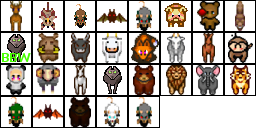

- animal_mythical.png
- Notes: Renamed tileset.


- animal_reptile.png
- Notes: New tileset.


beast
- beast_beholder.png
- Notes: Renamed tileset.


- beast_gargoyle.png
- Notes: Renamed tileset.


- beast_misc.png
- Notes: New tileset.


- beast_mutant.png
- Notes: New tileset.


- beast_slime.png
- Notes: New tileset.


chess pieces
- chess.png

demon
- demon.png
- Notes: violet avenger, devil queen & balrog added.


dragon
- dragon.png
- Notes: New tileset.


dwarf
- duergar.png

- dwarf.png
- Notes: Removed giant dwarf, Dhohr Nuggetcutter & Lord Durin.


- giant_dwarf.png
- Notes: New tileset.


- mountain_dwarf.png

elemental
- elemental.png
- Notes: New tileset.


elf
- albino_elf.png

- dark_elf.png

- elf.png

giant
- giant.png
- Notes: New tileset.


gnome
- gnome.png

goblin
- goblin.png

human
- human_amazon.png
- Notes: Renamed tileset.


- human_assassin.png
- Notes: Renamed tileset.


- human_barbarian.png

- human_blordrough.png
- Notes: Renamed tileset.


- human_cannibal.png
- Notes: New tileset.


- human_chaos.png
- Notes: Renamed tileset.


- human_imperial.png
- Notes: imperial veteran added.


- human_kalavan.png
- Notes: imperial veteran removed. wisewoman tile ID has changed from 4 to 0.


- human_madaram.png
- Notes: kasarkutominubat removed. windwalker tile ID changed from 12 to 0.


- human_mithrilbourgh.png
- Notes: Renamed tileset.


- human_monk
- Notes: New tileset.


- human_pirate
- Notes: This category has no logic tileset yet.
- human_risecia.png
- Notes: New tileset.


- human_wizard.png
- Notes: Renamed tileset.


humanoid
- humanoid_aruthon.png
- Notes: New tileset.


- humanoid_fairy.png
- Notes: New tileset.


- humanoid_misc.png
- Notes: New tileset. Possibly merge into humanoid.png.


- humanoid_mohiko.png
- Notes: New tileset.


- humanoid_roohako.png
- Notes: New tileset. Possibly merge into humanoid.png.


hybrid
- hybrid_arachnid.png
- Notes: New tileset. Possibly merge into hybrid.png.


- hybrid_feline.png
- Notes: New tileset. Possibly merge into hybrid.png.


- hybrid_frogman.png
- Notes: Renamed tileset.


- hybrid_kobold.png
- Notes: Renamed tileset.


- hybrid_minotaur.png
- Notes: Renamed tileset.


- hybrid_naga.png
- Notes: Renamed tileset.


- hybrid_ratfolk.png
- Notes: Renamed tileset.


- hybrid_sheepman.png
- Notes: Renamed tileset.


- hybrid_werewolf.png
- Notes: New tileset. Possibly merge into hybrid.png.


oni
- oni.png

orc
- orc.png

- mountain_orc.png

troll
- cyclops.png
- Notes: New tileset (tile ID is the same). Possibly make cyclops category.


- ogre.png
- Notes: New tileset. possibly make ogre category.


- troll.png

undead
- undead_animal.png
- Notes: New tileset. Possibly merge into undead.png.


- undead_fallen.png
- Notes: New tileset. Possibly merge into undead.png.


- undead_lich.png
- Notes: New tileset.


- undead_misc.png
- Notes: New tileset. Possibly merge into undead.png.


- undead_mummy.png
- Notes: Renamed tileset.


- undead_skeleton.png
- Notes: New tileset.


- undead_specter.png
- Notes: New tileset.


- undead_vampire.png
- Notes: Renamed tileset.


- undead_zombie.png
- Notes: New tileset.