HowToWriteAdventureGamesUsingArianne: Difference between revisions
imported>MiguelAngelBlanchLardin |
imported>Hendrik Brummermann No edit summary |
||
| (165 intermediate revisions by 4 users not shown) | |||
| Line 1: | Line 1: | ||
{{Navigation for Marauroa Top|Using}} |
|||
=Howto write Adventures games using arianne= |
|||
{{Navigation for Marauroa Users}} |
|||
'''NOTE:''' This tutorial describes the early steps in creating an adventure game. [[Stendhal]] is now a couple of years old and a lot has happened since then. This document, however, is still an interesting read if you are planning to start your own adventure game. |
|||
=Introduction= |
=Introduction= |
||
| Line 11: | Line 20: | ||
* Deployment |
* Deployment |
||
Arianne is a multiplayer online games framework and engine to develop turn based and real time games. It provides a simple way of creating games on a portable and robust server architecture. Marauroa, the server, is coded in Java and |
Arianne is a multiplayer online games framework and engine to develop turn based and real time games. It provides a simple way of creating games on a portable and robust server architecture. Marauroa, the server, is coded in Java and can use Java or Python for your game description. It also provides a SQL backend and uses a TCP transport channel to communicate with the clients. |
||
Our reference clients are coded using Java |
Our reference clients are coded using Java (C in the past) in order to achieve maximum portability. |
||
The Arianne engine is designed so that you can concentrate on designing the actual game and ignore all the detailed implementation aspects of a complex system, such as those in the multiplayer online game content server. You therefore need not be concerned with issues of Thread, Database and Network handling. |
The Arianne engine is designed so that you can concentrate on designing the actual game and ignore all the detailed implementation aspects of a complex system, such as those in the multiplayer online game content server. You therefore need not be concerned with issues of Thread, Database and Network handling. |
||
Arianne has been in development since 1999 and has evolved from a tiny application written in pseudo-C++ to a powerful, expandable but simple server framework, running on the Java platform, and a client framework, written in bare C to allow total portability of arianne's clients. Arianne's server is totally client agnostic for maximum flexibility. |
|||
Since the beginning, the key concept at the heart of Arianne's development has been KISS: Keep it simple, stupid! |
Since the beginning, the key concept at the heart of Arianne's development has been KISS: Keep it simple, stupid! |
||
| Line 22: | Line 29: | ||
Arianne has always been an Open source project, written and released under the GNU GPL license. We believe the right way is the Open Source way and we want you to have the power to change, edit and configure whatever you want, both in the clients and server. Arianne always welcomes your contributions and modifications to the code to create the best possible open source reference platform for game content providers. |
Arianne has always been an Open source project, written and released under the GNU GPL license. We believe the right way is the Open Source way and we want you to have the power to change, edit and configure whatever you want, both in the clients and server. Arianne always welcomes your contributions and modifications to the code to create the best possible open source reference platform for game content providers. |
||
All our efforts are supported by Arianne's |
All our efforts are supported by Arianne's engine: Marauroa. Marauroa is written completely in Java using a multithreaded server architecture with a TCP oriented network protocol, a SQL based persistence engine and a flexible game system. Marauroa is totally game agnostic and makes very little assumptions about what you are trying to make thus allowing great freedom when creating games. The game system is totally expandable and modifiable to suit your game's needs. It is able to run Python scripts defining the game's rules hence providing a simple way of specifying your games behavior. |
||
Marauroa is based on a design philosophy we called Action/Perception. A Perception is a collection of data sent each turn to the clients explaining to them what they currently perceive in the game environment. Actions are sent from clients to the server and are used to ask the server to perform an action for them. |
Marauroa is based on a design philosophy we called Action/Perception. A Perception is a collection of data sent each turn to the clients explaining to them what they currently perceive in the game environment. Actions are sent from clients to the server and are used to ask the server to perform an action for them. |
||
| Line 64: | Line 71: | ||
A first draft of the game world looks like this: |
A first draft of the game world looks like this: |
||
[[Image:Stendhal_Map.jpg]] |
|||
| Line 154: | Line 161: | ||
However, this simple system is powerful enough to code nearly all games easily: both real-time and turn based games. |
However, this simple system is powerful enough to code nearly all games easily: both real-time and turn based games. |
||
[[Image:PerceptionActionPerception.png]] |
|||
One of the main issues in the game design is choosing a turn time for the server. It should be based on the type of game we are making. For example, a real time strategy game will need turn times of around 300 ms, while a turn based strategy game will work fine with 1000-1500 ms of turn time. Turn based games save a lot of bandwidth compared to non-turn based however note that the lower the turn time, the higher the bandwidth usage. Also remember that, the lower the turn time, the higher the CPU usage. |
One of the main issues in the game design is choosing a turn time for the server. It should be based on the type of game we are making. For example, a real time strategy game will need turn times of around 300 ms, while a turn based strategy game will work fine with 1000-1500 ms of turn time. Turn based games save a lot of bandwidth compared to non-turn based however note that the lower the turn time, the higher the bandwidth usage. Also remember that, the lower the turn time, the higher the CPU usage. |
||
| Line 165: | Line 172: | ||
An RPObject is also built up of Slots. A Slot is a container of objects, much like a pocket, a bag, a box or a hand. The point is that if our objects need to have objects inside them, or attached to them, you need to use Slots. |
An RPObject is also built up of Slots. A Slot is a container of objects, much like a pocket, a bag, a box or a hand. The point is that if our objects need to have objects inside them, or attached to them, you need to use Slots. |
||
[[Image:RPObjectER.png]] |
|||
All the dynamic changes to the world are made using Actions. An RPAction is also made up of attributes. You must redefine the default attributes of the action object so that the action becomes specific to your game. |
All the dynamic changes to the world are made using Actions. An RPAction is also made up of attributes. You must redefine the default attributes of the action object so that the action becomes specific to your game. |
||
| Line 173: | Line 180: | ||
The whole game area will look like: |
The whole game area will look like: |
||
[[Image:Stendhal_Map.jpg]] |
|||
It is split into 5 different areas to use the multizones feature of Arianne.<br> |
It is split into 5 different areas to use the multizones feature of Arianne.<br> |
||
| Line 197: | Line 204: | ||
http://arianne.sourceforge.net/wiki_images/plains.jpg |
http://arianne.sourceforge.net/wiki_images/plains.jpg |
||
=== Forest === |
|||
| ⚫ | |||
==Entities design== |
==Entities design== |
||
| Line 293: | Line 302: | ||
====Sheep's user case==== |
====Sheep's user case==== |
||
Sheep is our key game concept. |
Sheep is our key game concept. The player must shepherd their lambs, protecting them wolves and such until they are worth selling. |
||
<pre> |
<pre> |
||
Sheep is in Farm |
Sheep is in Farm |
||
| Line 310: | Line 319: | ||
====Wolf's user case==== |
====Wolf's user case==== |
||
Wolf is the |
Wolf is the competitive entity on Stendhal. They join to attack sheep and often also players. They can kill a sheep quickly. |
||
<pre> |
<pre> |
||
Wolf moves |
Wolf moves |
||
| Line 501: | Line 510: | ||
To set these values we have run a simulation until we have get the right look in the graphs.<br> |
To set these values we have run a simulation until we have get the right look in the graphs.<br> |
||
[[Image:Rat Fight.gif]] |
|||
| ⚫ | |||
====Cave Rat==== |
====Cave Rat==== |
||
| Line 511: | Line 520: | ||
To set these values we have run a simulation until we have get the right look in the graphs.<br> |
To set these values we have run a simulation until we have get the right look in the graphs.<br> |
||
[[Image:Caverat Fight.gif]] |
|||
http://arianne.sourceforge.net/wiki_images/caverat.gif |
|||
====Wolf==== |
====Wolf==== |
||
| Line 521: | Line 530: | ||
To set these values we have run a simulation until we have get the right look in the graphs.<br> |
To set these values we have run a simulation until we have get the right look in the graphs.<br> |
||
[[Image:Wolf Fight.gif]] |
|||
http://arianne.sourceforge.net/wiki_images/wolf.gif |
|||
=== Experience and levels === |
=== Experience and levels === |
||
| Line 637: | Line 646: | ||
We can have as many as we want of this action. The last action executed will be the only one that alters really direction and speed. |
We can have as many as we want of this action. The last action executed will be the only one that alters really direction and speed. |
||
We will have our avatar moving on the world at complete units, and client will smooth it to make it appear that avatar moved just a bit. Also we want our avatar to move only N,W,S and E direction so we disable diagonal movement. |
|||
Our world will have objects, and if player collide with an object it will stop.<br> |
|||
Players, creatures and other objects in general aren't trespasable. |
|||
===Move to a position=== |
===Move to a position=== |
||
| Line 669: | Line 683: | ||
* Can't attack NPC |
* Can't attack NPC |
||
We want to preserve a nice game experience so we have removed player vs player combat. |
We want to preserve a nice game experience so we have removed player vs player combat.<br> |
||
We can have only ONE attack action, so choose wisely your target, and this action is cancelled by any other action but '''Chat''' and '''Heal'''. |
We can have only ONE attack action, so choose wisely your target, and this action is cancelled by any other action but '''Chat''' and '''Heal'''. |
||
| Line 679: | Line 693: | ||
The attack action has the implicit meaning of following the target. |
The attack action has the implicit meaning of following the target. |
||
==AI Logic design== |
|||
=Implementation= |
|||
==Server== |
|||
===Getting ready=== |
|||
===Server: Game rules logic=== |
|||
===Server: Game world implementation=== |
|||
===Server: Game AI implementation=== |
|||
==Client== |
|||
===Client: Game logic=== |
|||
===Client: Game presentation=== |
|||
=Evaluation= |
=Evaluation= |
||
==Download the files from Sourceforge== |
==Download the files from Sourceforge== |
||
| Line 696: | Line 699: | ||
==Client== |
==Client== |
||
==Server== |
==Server== |
||
[[Category:Marauroa]] |
|||
{{#breadcrumbs: [[Marauroa]] | [[Navigation for Marauroa Users|Using]] | [[HowToWriteAdventureGamesUsingArianne|How to write games]]}} |
|||
Latest revision as of 23:25, 18 September 2010
NOTE: This tutorial describes the early steps in creating an adventure game. Stendhal is now a couple of years old and a lot has happened since then. This document, however, is still an interesting read if you are planning to start your own adventure game.
Introduction
This document is a tutorial that will help you develop multiplayer online games using the Arianne system and Java2D.
Writing a game is a process that involves several stages:
- Specification
- Design
- Implementation
- Evaluation
- Deployment
Arianne is a multiplayer online games framework and engine to develop turn based and real time games. It provides a simple way of creating games on a portable and robust server architecture. Marauroa, the server, is coded in Java and can use Java or Python for your game description. It also provides a SQL backend and uses a TCP transport channel to communicate with the clients. Our reference clients are coded using Java (C in the past) in order to achieve maximum portability.
The Arianne engine is designed so that you can concentrate on designing the actual game and ignore all the detailed implementation aspects of a complex system, such as those in the multiplayer online game content server. You therefore need not be concerned with issues of Thread, Database and Network handling.
Since the beginning, the key concept at the heart of Arianne's development has been KISS: Keep it simple, stupid!
Arianne has always been an Open source project, written and released under the GNU GPL license. We believe the right way is the Open Source way and we want you to have the power to change, edit and configure whatever you want, both in the clients and server. Arianne always welcomes your contributions and modifications to the code to create the best possible open source reference platform for game content providers.
All our efforts are supported by Arianne's engine: Marauroa. Marauroa is written completely in Java using a multithreaded server architecture with a TCP oriented network protocol, a SQL based persistence engine and a flexible game system. Marauroa is totally game agnostic and makes very little assumptions about what you are trying to make thus allowing great freedom when creating games. The game system is totally expandable and modifiable to suit your game's needs. It is able to run Python scripts defining the game's rules hence providing a simple way of specifying your games behavior.
Marauroa is based on a design philosophy we called Action/Perception. A Perception is a collection of data sent each turn to the clients explaining to them what they currently perceive in the game environment. Actions are sent from clients to the server and are used to ask the server to perform an action for them.
You should always grab the latest release of Arianne from http://arianne.sourceforge.net as we are constantly fixing bugs and improving features.
Stendhal game example
In this document I will show, as an example of the development of a game, the development of the stendhal game.
I will give more guidelines and templates to help you start your own game at the end of the document but please first read the stendhal example. It is essential to see a real working example of a game to fully understand the Arianne system.
Prerequisites
Developing a multiplayer online game is a very complex task. In fact I would say that it is the most complex software development task that you can imagine. Arianne lowers that complexity level several orders of magnitude! However, there are still several things you need to have a knowledge of to successfully understand this game design example:
- Java: Everything in this example is coded using Java.
- Client/Server concepts: These will help you understand why things are done the way they are.
- Game design: Having a knowledge of game design will simplify the understanding of the overall document.
Just make sure you know the basics, i.e. you are able to write Java code and that you know a little about game design procedures.
Remember that Arianne provides a client/server middleware which needs extending and modifing to suit your game thus you need to think about both the server and client sides:
- Server: this is similar to the referee of all the online players. It tells every player what he/she sees and what he/she can do. It also determines the result of actions that players perform.
- Client: these are similar to a TV in that they use information from the server to provide a view in to the game. The client also takes input from the player and sends that to the server.
There are no other prerequisites to using Arianne technology and you should find nearly everything else you need will be explained in this document. So let's get started!
Specification
Before starting to do anything, think about the game you want to implement.
Decide what your game is about, what features it will have, what will make it different to other similar games, what technologies
will be used in it, and so on... Try to plan your design well first to avoid problems later.
For our example we are going to write a game called stendhal.
Basic Description
Stendhal is a full fledged multiplayer online adventures game (MMORPG) developed using the Arianne game development system.
Stendhal features a new, rich and expanding world in which you can explore towns, buildings, plains, caves and dungeons. You will meet NPCs and acquire tasks and quests for valuable experience and cold hard cash. Your character will develop and grow and with each new level up become stronger and better. With the money you acquire you can buy new items and improve your armour and weapons. And for the blood thirsty of your; satisfy your killing desires by roaming the world in search of evil monsters!
A first draft of the game world looks like this:

and the game should looks like:
http://arianne.sourceforge.net/wiki_images/Stendhal_GUI_detailed.jpg

The GFX is not the actual ingame look
Multiplayer fun
The multiplayer approach is based on cooperation and competitiveness between players:
- Players can cooperate to grow up sheeps safer and faster
- Players can cooperate to kill strong creatures
- Players can compete against each other to kill other player sheeps.
- Players can compete against each other by luring monsters into other player.
It could also be possible to consider this a newbie area to train players to really play on a bigger area with more monsters, problems and new tasks.
Why a Zelda like game?
Stendhal is a good example of game to code using Arianne because it exposes issues similar to those on more complex games like:
- There are lots of objects in the world
- Objects have triggers associated with them
- There is character development in the game
- The World is persistent
- AI (of the NPC, Sheeps and Wolves) is complex as it would be in a more complex RPG game
- Everything is conceptually simple however
- Lag does matter a lot
As you see Stendhal is a minigame that try to push everything related to RPG:
- Tasks that players need to accomplish in several steps
- Actions that players can do in a context based situation
- Several areas that player need to explore
- Role playing to cooperate and compete
Details
We need to think about what happens or appears in the game and build a few detailed 'Use cases' to point entities and actions existing in the game.
Once we know what will appear in the game we can make seperate, detailed descriptions of each entity of the game. If this sounds to you like OOP methodologies, then pat yourself on the back, as you are right! Arianne uses an Object based design approach.
In the game we have the following entities:
- Zones
- City
- Village
- Plains
- Forest
- Dungeons
- Creatures
- Sheep
- Rat
- Cave rat
- Wolf
- Players
- NPC
- Quests
Goal
As many multiplayer games Stendhal doesn't have a clear goal.
The goal could be:
- Be the best player in the world
- Get the strangest item from the deepest dungeon
- Explore the whole world
- Make yourself a legend :)
It is hard to explain the goal, but once you start to play you are hooked :)
Game overall look
We need to know what the game will look like before moving forward. We use a standard pacman game as a reference:
http://arianne.sourceforge.net/wiki_images/StendhalLook.jpg

Design
Technology used
To implement mapacman we are going to use Arianne, our multiplayer online game engine. So before designing the game we must understand the main concepts and ideas of Arianne. We need to make the design fit some simple rules to get the easiest design with the best possible performance.
Arianne uses the UDP transport protocol, which is the fastest, lowest ping transport available. However, it comes at the cost of the application not being able to detect lost packets. If your connection is really bad you will often become out of sync with the server as so much data sent will be lost. However, there is no transport method will help you with this type of connection!
Arianne's system is based on a Perception/Action/Perception scheme. This involves the server sending the clients a Perception, which is a list of RPObjects (the objects in Arianne are of type RPObject) with the modifications, additions and removals that happened in that turn. The clients take the Perception and process it to update their view of the game environment and then if they want to perform an action they send an RPAction (actions in Arianne as of type RPAction) back to the server. On the next turn the server sends a new perception message that will contain the result of the action (i.e. the changes to the objects affected by the action).
This scheme has several advantages:
- Works perfectly with turn based and real time based games
- There is a coherent state of the game at each point in time
- Players with a low ping time don't get an insane advantage
- Turn time can be modified to improve bandwidth/performance
- Support for several orders of magnitude more players than other systems.
On the other hand it suffers from an obvious set of disadvantages:
- Results are only made valid when the turn actually happens (i.e. an actions result will only appear in the next turn)
- Not the best/easiest way to make a First Person Shooter type game
However, this simple system is powerful enough to code nearly all games easily: both real-time and turn based games.

One of the main issues in the game design is choosing a turn time for the server. It should be based on the type of game we are making. For example, a real time strategy game will need turn times of around 300 ms, while a turn based strategy game will work fine with 1000-1500 ms of turn time. Turn based games save a lot of bandwidth compared to non-turn based however note that the lower the turn time, the higher the bandwidth usage. Also remember that, the lower the turn time, the higher the CPU usage.
Perceptions are made up of a list of RPObjects. An RPObject is built up of several Attributes that are of the form:
attribute=value
The attributes allow the storage of strings, ints and floats in the object.
An RPObject is also built up of Slots. A Slot is a container of objects, much like a pocket, a bag, a box or a hand. The point is that if our objects need to have objects inside them, or attached to them, you need to use Slots.

All the dynamic changes to the world are made using Actions. An RPAction is also made up of attributes. You must redefine the default attributes of the action object so that the action becomes specific to your game.
Every player is stored in a relational database using the MySQL database system. You don't need to know how this is done but you can trust me that it works! Everything is stored in the database thus making the whole world permanent. It is up to you to decide to which degree things need be stored in the database and when and how often they should be committed (stored). The database is the main bottleneck of Arianne at the time of writing.
World design
The whole game area will look like:
It is split into 5 different areas to use the multizones feature of Arianne.
Players need to change zone in order to accomplish their task and progress in the game.
City
The city is build of two zones: one above where the sheep buyer works and one down full of rats to win XP easily.
http://arianne.sourceforge.net/wiki_images/city.jpg
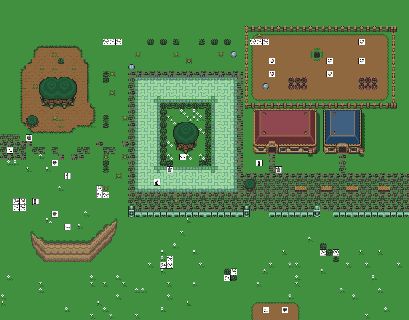
http://arianne.sourceforge.net/wiki_images/city_underground.jpg
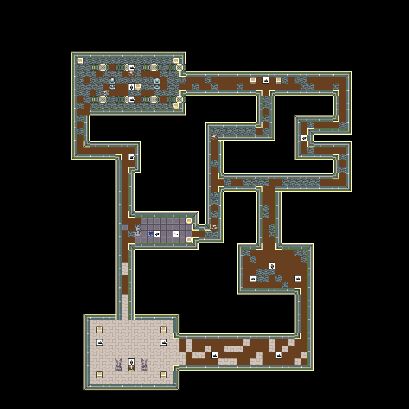
You can move using the hole near the tree from one to the other. Also this zone has some buyer's sheeps and a few NPC like: Carmen, the welcomer and Diogenes, a misterious beggar.
Village
In the village lives the Sheeps' seller: Nagashi, he will sell you sheeps to grow them up.
http://arianne.sourceforge.net/wiki_images/village.jpg

Plains
Where can you find a better place for growing sheeps? But sheeps is food of wolves. This zone contains several wolves and rats.
http://arianne.sourceforge.net/wiki_images/plains.jpg

Forest
http://arianne.sourceforge.net/wiki_images/forest.png

Entities design
To make this world appear to be live we have added the next entities.
- Sheep
- Sheep seller
- Sheep buyer
- Wolf
- Rat
- Cave rat
- Player
- Food
- Armor
- Weapon
- Healing potion
User cases
These user case describe the behaviour of the entities. This help us in the coding stage by making clear the goals to achieve.
Player's user case
Player is an entity that play the game, it can move, chat, attack, heal.
  Player enter village in entry point
  Player moves to Farm zone

  Player talks with Sheep seller
    Player: Hi
    Seller: Greetings! How may I help you?
    Player: buy Sheep
    Seller: Do you want to buy a Sheep for 50 coins?
    Player: yes
    Seller: Thank you! Bye

  Player moves. Sheep follows Player.
  Player moves to plains
  Player moves around looking for food
  Player protect Sheep of wolves attacks

  When Sheep is big enough Player moves to Village
  Player talks with Sheep buyer
    Player: Hi
    Buyer: Greetings! How may I help you?
    Player: sell Sheep
    Buyer: Do you want to sell this Sheep for 73 coins?
    Player: yes
    Buyer: Thank you! Bye

  Player spend money in new Sheep and equipment
  * Armor
  * Weapon
  * Healing potions
Sheep seller's user case
This seller is a NPC entity that will sell us a sheep to grow it up and make money.
FOREVER do:
  Listen to Player

  If listen "Hi":
    Seller says "Greetings <Player>!"

  If listen "Buy Sheep" from Player:
    Seller says "Do you want to buy a Sheep for 50 coins?"

  If listen "yes" from Player:
    If Player money - 50 > 0:
      set Player money=Player money - 50
      Duplicate Sheep
      Make Sheep follows Player
  Say bye to Player
DONE
Sheep buyer's user case
This buyer is a NPC entity that will buy us our sheep.
FOREVER do:
  Listen to Player

  If listen "Hi":
    Seller says "Greetings <Player>!"

  If listen "Sell Sheep" from Player:
    Estimate Sheep value related to Sheep weight
    Seller says "Do you want to sell your Sheep for <estimated price> coins?"

  If listen "yes" from Player:
    set Player money=Player money + <estimated price>
    set Player XP=Player XP + 100 * Sheep Weight / 100
    Destroy Sheep

  Say bye to Player
DONE
Sheep's user case
Sheep is our key game concept. The player must shepherd their lambs, protecting them wolves and such until they are worth selling.
  Sheep is in Farm
  Player buys Sheep
  Sheep seller duplicates Sheep
  Sheep follows Player

  If Sheep finds food:
    Sheep moves to food
    Sheep eats food
    Sheep gains weight

  Player sells Sheep
  Sheep dissappear
Wolf's user case
Wolf is the competitive entity on Stendhal. They join to attack sheep and often also players. They can kill a sheep quickly.
  Wolf moves
  If Wolf sees Sheep:
    Wolf attacks Sheep

  If Wolf is attacked:
    Wolf attacks Attacker
Rat's user case
Rat and Cave rats are creatures that will attack player to make it harder to grow the sheep up.
  Rat moves
  If Rat sees Player:
    Rat attacks Player

  If Rat is attacked:
    Rat attacks Attacker
Let's describe each entity and its attributes and actions.
Sheep
A sheep has the following set of attributes:
- x is the x-position of the sheep
- y is the y-position of the sheep
- dx is the x-speed of the sheep
- dy is the y-speed of the sheep
- hp is the life indicator of the sheep, when it reach 0 the sheep dies.
- atk is the RP attack value. See RP rules
- def is the RP defense value. See RP rules
- xp is the RP experience value. See RP rules
- weight is the weight indicator of the sheep, the more weight, the more expensive it is.
Sheep tasks should be:
- follow
- eat
The sheeps behaviour is mainly to follow its owner and look for food.
If the Sheep finds food, it will eat.
Sheep will runaway if attacked.
Creatures: Wolf, rat and Cave rat
Wolves, rats and cave rats have the following set of attributes:
- x is the x-position of the wolf
- y is the y-position of the wolf
- dx is the x-speed of the wolf
- dy is the y-speed of the wolf
- hp is the life indicator of the wolf, when it reach 0 the wolf dies.
- atk is the RP attack value. See RP rules
- def is the RP defense value. See RP rules
- xp is the RP experience value. See RP rules
Wolf ( and rat and cave rat ) tasks should be:
- follow means that wolf follows an object using the shortest way to reach it.
- attack means that wolf will try to damage the attacked object until its hp reach 0
Another action will cancel attack task. - patrol means that wolf will move around a specified path.
- chat means that wolf will start to shout 'auuuuuuu!'. Wolves will often understand this as a call.
Wolf ( and rat and cave rat ) behaviour consists of patrolling some assigned areas.
If the Wolf finds a Sheep, it will attack Sheep.
If the Wolf finds a Player, it will attack player.
If the Wolf is attacked, the Wolf returns the attacks.
If the Wolf is severly injured, the Wolf will runaway.
Sheep seller, Sheep buyer, Beggar
The buyer and seller have the following set of attributes:
- x is the x-position of the NPC
- y is the y-position of the NPC
- dx is the x-speed of the NPC
- dy is the y-speed of the NPC
- hp is the life indicator of the NPC, when it reach 0 it is reset back to full.
- atk is the RP attack value. See RP rules
- def is the RP defense value. See RP rules
- xp is the RP experience value. See RP rules
- attending is the object_id of the player that is actually attending.
seller, buyer and beggar tasks would be:
- patrol means that NPC will move around a specified path.
NPC behaviour consists of listening to people near them.
If person says "Hi", NPC faces person and generates conversation.
Player
The player has the following set of attributes:
- x is the x-position of the player
- y is the y-position of the player
- dx is the x-speed of the player
- dy is the y-speed of the player
- hp is the life indicator of the Player, when it reach 0 the player dies. See Dead
- atk is the RP attack value. See RP rules
- def is the RP defense value. See RP rules
- xp is the RP experience value. See RP rules
- money is the quantity of money the player has.
It has three slots:
- armor
- left hand
- right hand
- backpack
Player tasks should be:
- move means that player will change its dx, dy params to move.
- attack means that player will try to damage the attacked object until its hp reach 0.
Another action will cancel attack task. - chat means that player writes text to other players or NPCs
Food
Food has the following set of attributes:
- x is the x-position of the player
- y is the y-position of the player
- quantity is the amount of food available
Food will be regenerated every X units of time.
Armor
Armor is an item that player can wear:
- x is the x-position of the armor when player doesn't wear it.
- y is the y-position of the armor when player doesn't wear it.
- def is the RP defense value. See RP rules
- weight is the weight of the armor.
Shield
Shield is an item that player can wear:
- x is the x-position of the shield when player doesn't wear it.
- y is the y-position of the shield when player doesn't wear it.
- def is the RP defense value. See RP rules
- weight is the weight of the shield.
Weapon
Weapon is an item that player can wear:
- x is the x-position of the weapon when player doesn't wear it.
- y is the y-position of the weapon when player doesn't wear it.
- atk is the RP attack value. See RP rules
- weight is the weight of the weapon.
Healing potion
Healing potion is an item that player can wear inside the backpack:
- x is the x-position of the potion when player doesn't wear it.
- y is the y-position of the potion when player doesn't wear it.
- heal is the amount of HP the potion will heal.
RP design
Role playing games are based in a set of rules. There are many set of rules: AD&D, GURPS, Warhammer,...
Stendhal defines a new typical set of rules, that has in common simplicity and ease of computing.
The system is based around 3 ideas:
- Randomness using 1D6
- Risk evaluation
- Creativity
Risk evaluation gives the DM the power to weight up an action that a player wishes to perform against things like how experienced the player is in that type of action and the situation the player is in.
DM stands for Dungeon Master. In Stendhal our task is to design the DM, as it rules the game.
Attributes
Each player has a set of attributes that are:
- attack - this value is used to resolve attack situations.
- defense - this value is used to resolve situations where the player is attacked.
- hp - this value stored the live points available.
- level - this starts off as zero when the character is created and will increase related to experience
- experience - this is the amount of experience gained at the current level
The hardest part of any RP is to give balance to the values different entities has.
We need to give RP(atk, def and hp) values to:
Player
Let's make our starting player to be:
- ATK - 2
- DEF - 2
- HP - 100
These values have been set randomly.
Sheep
A sheep can't attack, so it has to be weaker than player.
- ATK - 0
- DEF - 1
- HP - 30
These values have alse been set randomly according to player values. Killing a sheep won't report you any experience.
Rat
A rat is the simplest enemy you can find in Stendhal, so it has to be simple enought for a Level 1 player to kill.
- ATK - 3
- DEF - 2
- XP - 5
- HP - 10
To set these values we have run a simulation until we have get the right look in the graphs.

Cave Rat
A cave rat is a stronger version of a rat, so it has to be simple enought for a Level 2-3 player to kill.
- ATK - 6
- DEF - 2
- XP - 10
- HP - 20
To set these values we have run a simulation until we have get the right look in the graphs.

Wolf
A wolf is a common creature on plains and forest, it has to be simple enought for a Level 4-5 player to kill.
- ATK - 6
- DEF - 4
- XP - 18
- HP - 35
To set these values we have run a simulation until we have get the right look in the graphs.

Experience and levels
All of the attributes can be increased during the game through gaining experience and levels. Experience is awarded by DM for several reasons:
- good roleplaying
- use of skills
- combats
Experience can't be gained by training.
When you gain a level you can increase one of the attributes. To reach a level you need to reach the next experience points:
| Level | Experience needed | HP value |
| 0 | 0 | 100 |
| 1 | 100 | 110 |
| 2 | 128 | 120 |
| 3 | 384 | 130 |
| 4 | 768 | 140 |
| 5 | 1408 | 150 |
| 6 | 2432 | 160 |
| 7 | 3712 | 170 |
| 8 | 5504 | 180 |
| 9 | 7808 | 190 |
| 10 | 10624 | 200 |
As you can deduce the HP grows at a rate of 10 per level, and ATK and DEF values are increased one on each new level. The formula to calculate XP is:
exp = (10*level+5*level^2+10*level^3+80)
Combat
Combat is a fight between two or more players.
The combat is round based. Each round takes 5 turns.
The risk to strike a player can be written as:
Attacker.attack VS Defender.defense/6 + 1D6
If player is hit we need to compute the wound that has been done:
  result = Attacker.attack/6 + 1D6 VS Defender.defense
  if result > 0:
    Defender.hp = Defender.hp - result
  end if
Death happens when hp reachs 0.
A critical hit happens when both die rolls are 6. And the damage is equal to Attacker.attack
Shields
The shield rating adds to your defense skill:
| Shield | Rating |
| Buckler shield | +1 |
| Small shield | +2 |
| Medium shield | +3 |
| Tower shield | +5 |
Armour
Armour helps you absorb damage.
| Armour | Rating |
| Leather armour | +1 |
| Studded leather armour | +2 |
| Scale mail armour | +3 |
| Chain mail armour | +4 |
| Plate mail armour | +5 |
| Field plate armour | +6 |
| Full plate armour | +7 |
Weapon
Weapon helps you to kill :)
| Weapon | Rating |
| Knife | +2 |
| Club | +3 |
| Spear | +4 |
| Axe | +5 |
| Long sword | +6 |
| Two hand sword | +7 |
Dead
The result of combat is usually dead.
When you kill a creature a corpse will appear. If you open it, you will be able to get whatever it has inside, usually food, gold, weapons, shields or armors.
Each time you kill a monster you are rewarded XP.
When you are killed you reappear on city and you lose your sheep if you have one.
Also to penalize dead, you are remove 10% of exp points and if it is the case you are removed HP, ATK and DEF increases because of level up.
Logic design
The key on making Stendhal moving is to add actions. As we have seen each entity has a list of actions that can do. Let's see them and study they interact.
Move
Move action can be understand as two actions:
Move to left,right,up or down while key is down
This action allows controlling gamer's avatar using our keyboard that is the arcade/adventure game style like Nintendo Zelda.
This action should have the next set of attributes:
- dir direction in which the avatar will move.
- speed speed of the avatar
We can have as many as we want of this action. The last action executed will be the only one that alters really direction and speed.
We will have our avatar moving on the world at complete units, and client will smooth it to make it appear that avatar moved just a bit. Also we want our avatar to move only N,W,S and E direction so we disable diagonal movement.
Our world will have objects, and if player collide with an object it will stop.
Players, creatures and other objects in general aren't trespasable.
Move to a position
This action allows controlling game's avatar using a mouse, so we can click ( or double click ) to move to the position where the mouse clicked. This mode is great for a more relaxed adventure game style like Bioware Baldur's Gate.
This action should have the next set of attributes:
- x desired x coordinate of the avatar
- y desired y coordinate of the avatar
We can only have ONE action of this type and only the latest one will be considered valid. This action is cancelled by any other action like Move, Attack, Face, ...
Both move actions will have at each end of turn, moving the avatar if it is possible dx units in the x axis and dy units in the y axis. If avatar collides with something while moving, dx and dy will become 0.
Face
This action is useful as a extra for the social side of the game; when you are talking it is often good to face the person you are talking too. So face action allows our character to look at the direction we tell it: left, right, up or down.
Chat
This action is the base of any social game like a MORPG.
This action should have the next set of attributes:
- text text that the player is going to say
Due to Arianne framework it is not possible to create a yell or whisper action, when you talk, you talk for everybody in the area, that is why area design is *VERY* important to achieve a good gameplay.
Attack
This action is the core of the gameplay for lots of gamers to consider the game fun. All the combat is ruled by the RP game system explained in the RP section of this page.
There are some limitations for combat right now:
- No PvP ( Player versus Player )
- Can't attack yourself
- Can't attack NPC
We want to preserve a nice game experience so we have removed player vs player combat.
We can have only ONE attack action, so choose wisely your target, and this action is cancelled by any other action but Chat and Heal.
This action should have the next set of attributes:
- target the object.ID of the player that we are attacking.
This action require that the target of the action is near our avatar. Near means that target's avatar have to be colliding with our avatar.
The attack action has the implicit meaning of following the target.
Evaluation
Download the files from Sourceforge
Using CVS access
Deployment
Client
Server
{{#breadcrumbs: Marauroa | Using | How to write games}}